ARP Poisoning
Address Resolution Protocol (ARP) is a stateless protocol used for resolving IP addresses to machine MAC addresses. All network devices that need to communicate on the network broadcast ARP queries in the system to find out other machines’ MAC addresses. ARP Poisoning is also known as ARP Spoofing.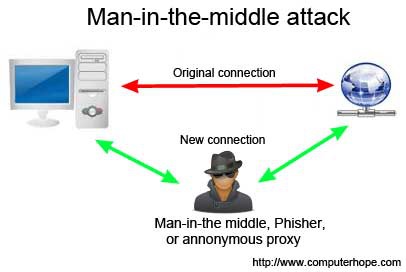


Here is how ARP works −
- When one machine needs to communicate with another, it looks up its ARP table.
- If the MAC address is not found in the table, the ARP_request is broadcasted over the network.
- All machines on the network will compare this IP address to MAC address.
- If one of the machines in the network identifies this address, then it will respond to the ARP_request with its IP and MAC address.
- The requesting computer will store the address pair in its ARP table and communication will take place.
What is ARP Spoofing?
ARP packets can be forged to send data to the attacker’s machine.
- ARP spoofing constructs a large number of forged ARP request and reply packets to overload the switch.
- The switch is set in forwarding mode and after the ARP table is flooded with spoofed ARP responses, the attackers can sniff all network packets.
Attackers flood a target computer ARP cache with forged entries, which is also known as poisoning. ARP poisoning uses Man-in-the-Middle access to poison the network.
What is MITM?
The Man-in-the-Middle attack (abbreviated MITM, MitM, MIM, MiM, MITMA) implies an active attack where the adversary impersonates the user by creating a connection between the victims and sends messages between them. In this case, the victims think that they are communicating with each other, but in reality, the malicious actor controls the communication.
A third person exists to control and monitor the traffic of communication between two parties. Some protocols such as SSL serve to prevent this type of attack.
ARP Poisoning − Exercise
In this exercise, we have used BetterCAP to perform ARP poisoning in LAN environment using VMware workstation in which we have installed Kali Linux and Ettercap tool to sniff the local traffic in LAN.
For this exercise, you would need the following tools −
- VMware workstation
- Kali Linux or Linux Operating system
- Ettercap Tool
- LAN connection
Note − This attack is possible in wired and wireless networks. You can perform this attack in local LAN.
Step 1 − Install the VMware workstation and install the Kali Linux operating system.
Step 2 − Login into the Kali Linux using username pass “root, toor”.
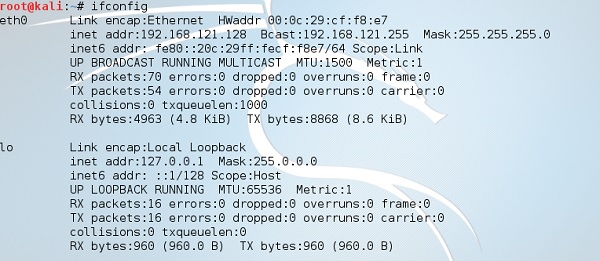
Step 3 − Make sure you are connected to local LAN and check the IP address by typing the command ifconfig in the terminal.
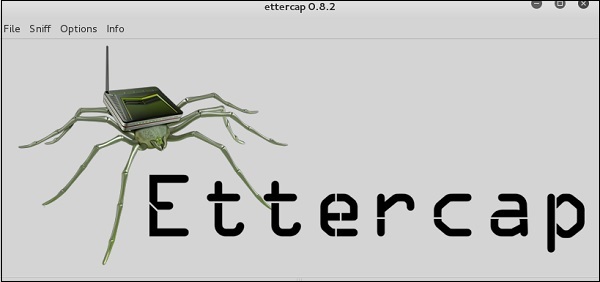
Step 4 − Open up the terminal and type “Ettercap –G” to start the graphical version of Ettercap.
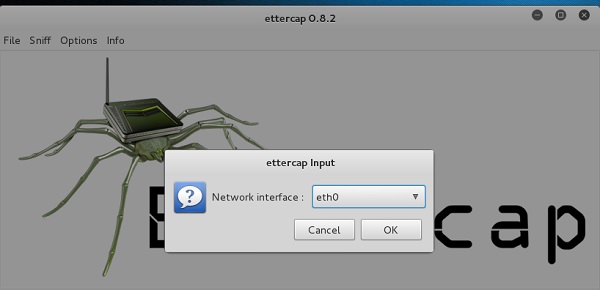
Step 5 − Now click the tab “sniff” in the menu bar and select “unified sniffing” and click OK to select the interface. We are going to use “eth0” which means Ethernet connection.
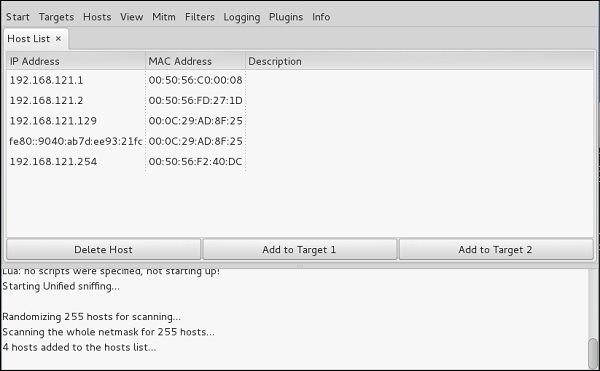
Step 6 − Now click the “hosts” tab in the menu bar and click “scan for hosts”. It will start scanning the whole network for the alive hosts.
Step 7 − Next, click the “hosts” tab and select “hosts list” to see the number of hosts available in the network. This list also includes the default gateway address. We have to be careful when we select the targets.
Step 8 − Now we have to choose the targets. In MITM, our target is the host machine, and the route will be the router address to forward the traffic. In an MITM attack, the attacker intercepts the network and sniffs the packets. So, we will add the victim as “target 1” and the router address as “target 2.”
In VMware environment, the default gateway will always end with “2” because “1” is assigned to the physical machine.
Step 9 − In this scenario, our target is “192.168.121.129” and the router is “192.168.121.2”. So we will add target 1 as victim IP and target 2 as router IP.
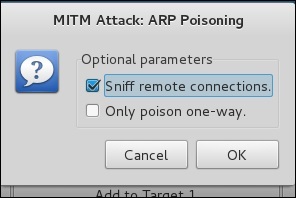
Step 10 − Now click on “MITM” and click “ARP poisoning”. Thereafter, check the option “Sniff remote connections” and click OK.
Step 11 − Click “start” and select “start sniffing”. This will start ARP poisoning in the network which means we have enabled our network card in “promiscuous mode” and now the local traffic can be sniffed.
Note − We have allowed only HTTP sniffing with Ettercap, so don’t expect HTTPS packets to be sniffed with this process.
Step 12 − Now it’s time to see the results; if our victim logged into some websites. You can see the results in the toolbar of Ettercap.
This is how sniffing works. You must have understood how easy it is to get the HTTP credentials just by enabling ARP poisoning.
ARP Poisoning has the potential to cause huge losses in company environments. This is the place where ethical hackers are appointed to secure the networks.
Like ARP poisoning, there are other attacks such as MAC flooding, MAC spoofing, DNS poisoning, ICMP poisoning, etc. that can cause significant loss to a network.
In the next chapter, we will discuss another type of attack known as DNS poisoning.
DNS Poisoning
DNS Poisoning is a technique that tricks a DNS server into believing that it has received authentic information when, in reality, it has not. It results in the substitution of false IP address at the DNS level where web addresses are converted into numeric IP addresses. It allows an attacker to replace IP address entries for a target site on a given DNS server with IP address of the server controls. An attacker can create fake DNS entries for the server which may contain malicious content with the same name.

For instance, a user types www.google.com, but the user is sent to another fraud site instead of being directed to Google’s servers. As we understand, DNS poisoning is used to redirect the users to fake pages which are managed by the attackers.
DNS Poisoning − Exercise
Let’s do an exercise on DNS poisoning using the same tool, Ettercap.
DNS Poisoning is quite similar to ARP Poisoning. To initiate DNS poisoning, you have to start with ARP poisoning, which we have already discussed in the previous chapter. We will use DNS spoof plugin which is already there in Ettercap.
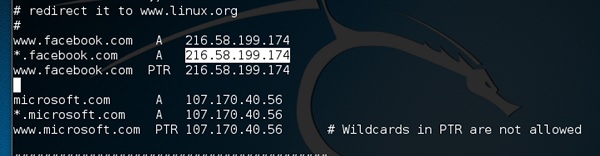
Step 1 − Open up the terminal and type “nano etter.dns”. This file contains all entries for DNS addresses which is used by Ettercap to resolve the domain name addresses. In this file, we will add a fake entry of “Facebook”. If someone wants to open Facebook, he will be redirected to another website.
Step 2 − Now insert the entries under the words “Redirect it to www.linux.org”. See the following example −
Step 3 − Now save this file and exit by saving the file. Use “ctrl+x” to save the file.
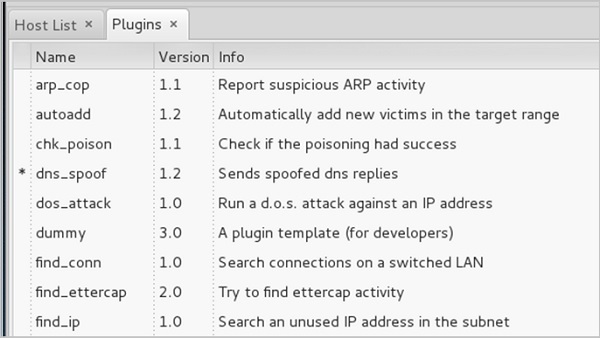
Step 4 − After this, the whole process is same to start ARP poisoning. After starting ARP poisoning, click on “plugins” in the menu bar and select “dns_spoof” plugin.
Step 5 − After activating the DNS_spoof, you will see in the results that facebook.com will start spoofed to Google IP whenever someone types it in his browser.
It means the user gets the Google page instead of facebook.com on their browser.
In this exercise, we saw how network traffic can be sniffed through different tools and methods. Here a company needs an ethical hacker to provide network security to stop all these attacks. Let’s see what an ethical hacker can do to prevent DNS Poisoning.
Defenses against DNS Poisoning
As an ethical hacker, your work could very likely put you in a position of prevention rather than pen testing. What you know as an attacker can help you prevent the very techniques you employ from the outside.
Here are defenses against the attacks we just covered from a pen tester’s perspective −
- Use a hardware-switched network for the most sensitive portions of your network in an effort to isolate traffic to a single segment or collision domain.
- Implement IP DHCP Snooping on switches to prevent ARP poisoning and spoofing attacks.
- Implement policies to prevent promiscuous mode on network adapters.
- Be careful when deploying wireless access points, knowing that all traffic on the wireless network is subject to sniffing.
- Encrypt your sensitive traffic using an encrypting protocol such as SSH or IPsec.
- Port security is used by switches that have the ability to be programmed to allow only specific MAC addresses to send and receive data on each port.
- IPv6 has security benefits and options that IPv4 does not have.
- Replacing protocols such as FTP and Telnet with SSH is an effective defense against sniffing. If SSH is not a viable solution, consider protecting older legacy protocols with IPsec.
- Virtual Private Networks (VPNs) can provide an effective defense against sniffing due to their encryption aspect.
- SSL is a great defense along with IPsec.
Summary
In this chapter, we discussed how attackers can capture and analyze all the traffic by placing a packet sniffer in a network. With a real-time example, we saw how easy it is to get the credentials of a victim from a given network. Attackers use MAC attacks, ARP and DNS poisoning attacks to sniff the network traffic and get hold of sensitive information such as email conversations and passwords.
Exploitation
Exploitation is a piece of programmed software or script which can allow hackers to take control over a system, exploiting its vulnerabilities. Hackers normally use vulnerability scanners like Nessus, Nexpose, OpenVAS, etc. to find these vulnerabilities.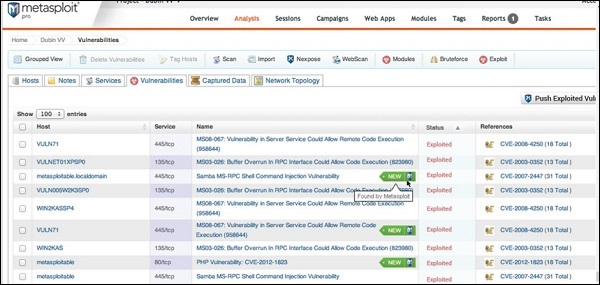
Metasploit is a powerful tool to locate vulnerabilities in a system.
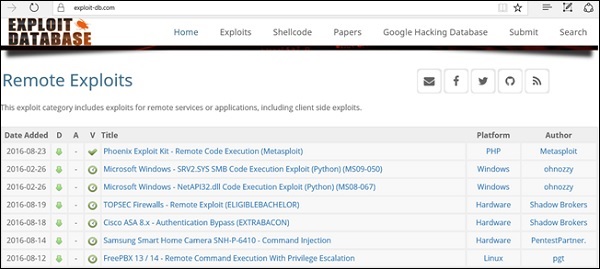
Based on the vulnerabilities, we find exploits. Here, we will discuss some of the best vulnerability search engines that you can use.
Exploit Database
www.exploit-db.com is the place where you can find all the exploits related to a vulnerability.
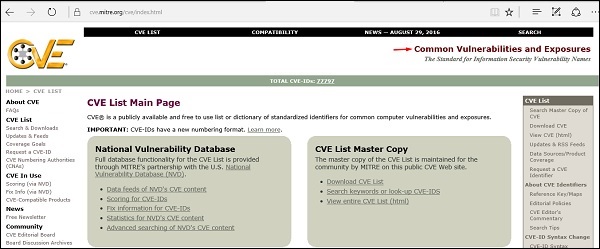
Common Vulnerabilities and Exposures
Common Vulnerabilities and Exposures (CVE) is the standard for information security vulnerability names. CVE is a dictionary of publicly known information security vulnerabilities and exposures. It’s free for public use. https://cve.mitre.org
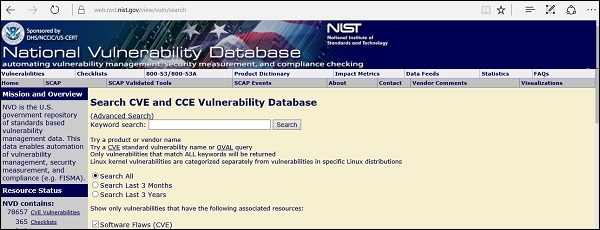
National Vulnerability Database
National Vulnerability Database (NVD) is the U.S. government repository of standards based vulnerability management data. This data enables automation of vulnerability management, security measurement, and compliance. You can locate this database at − https://nvd.nist.gov
NVD includes databases of security checklists, security-related software flaws, misconfigurations, product names, and impact metrics.
In general, you will see that there are two types of exploits −
- Remote Exploits − These are the type of exploits where you don’t have access to a remote system or network. Hackers use remote exploits to gain access to systems that are located at remote places.
- Local Exploits − Local exploits are generally used by a system user having access to a local system, but who wants to overpass his rights.
Quick Fix
Vulnerabilities generally arise due to missing updates, so it is recommended that you update your system on a regular basis, for example, once a week.
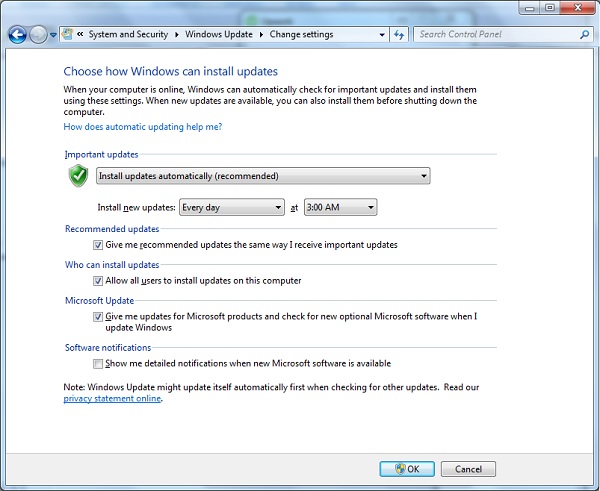
In Windows environment, you can activate automatic updates by using the options available in the Control Panel → System and Security → Windows Updates.
In Linux Centos, you can use the following command to install automatic update package.
yum -y install yum-cron
Enumeration
Enumeration belongs to the first phase of Ethical Hacking, i.e., “Information Gathering”. This is a process where the attacker establishes an active connection with the victim and try to discover as much attack vectors as possible, which can be used to exploit the systems further.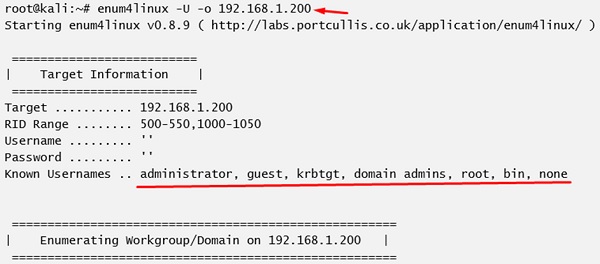
Enumeration can be used to gain information on −
- Network shares
- SNMP data, if they are not secured properly
- IP tables
- Usernames of different systems
- Passwords policies lists
Enumerations depend on the services that the systems offer. They can be −
- DNS enumeration
- NTP enumeration
- SNMP enumeration
- Linux/Windows enumeration
- SMB enumeration
Let us now discuss some of the tools that are widely used for Enumeration.
NTP Suite
NTP Suite is used for NTP enumeration. This is important because in a network environment, you can find other primary servers that help the hosts to update their times and you can do it without authenticating the system.
Take a look at the following example.
ntpdate 192.168.1.100 01 Sept 12:50:49 ntpdate[627]:adjust time server 192.168.1.100 offset 0.005030 secorntpdc [-ilnps] [-c command] [hostname/IP_address]root@test]# ntpdc -c sysinfo 192.168.1.100***Warning changing to older implementation***Warning changing the request packet size from 160 to 48system peer: 192.168.1.101system peer mode: clientleap indicator: 00stratum: 5precision: -15root distance: 0.00107 sroot dispersion: 0.02306 sreference ID: [192.168.1.101]reference time: f66s4f45.f633e130, Sept 01 2016 22:06:23.458system flags: monitor ntp stats calibratejitter: 0.000000 sstability: 4.256 ppmbroadcastdelay: 0.003875 sauthdelay: 0.000107 s
enum4linux
enum4linux is used to enumerate Linux systems. Take a look at the following screenshot and observe how we have found the usernames present in a target host.
smtp-user-enum
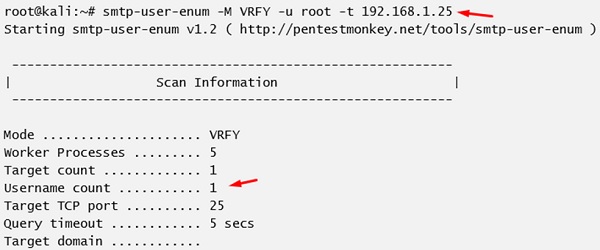
smtp-user-enum tries to guess usernames by using SMTP service. Take a look at the following screenshot to understand how it does so.
Quick Fix
It is recommended to disable all services that you don’t use. It reduces the possibilities of OS enumeration of the services that your systems are running.


No comments:
Post a Comment