Process
Like all good projects, ethical hacking too has a set of distinct phases. It helps hackers to make a structured ethical hacking attack.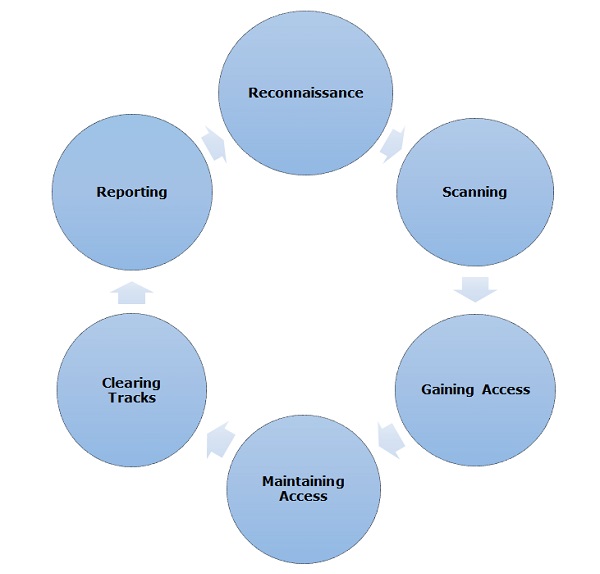
Different security training manuals explain the process of ethical hacking in different ways, but for me as a Certified Ethical Hacker, the entire process can be categorized into the following six phases.
Reconnaissance
Reconnaissance is the phase where the attacker gathers information about a target using active or passive means. The tools that are widely used in this process are NMAP, Hping, Maltego, and Google Dorks.
Scanning
In this process, the attacker begins to actively probe a target machine or network for vulnerabilities that can be exploited. The tools used in this process are Nessus, Nexpose, and NMAP.
Gaining Access
In this process, the vulnerability is located and you attempt to exploit it in order to enter into the system. The primary tool that is used in this process is Metasploit.
Maintaining Access
It is the process where the hacker has already gained access into a system. After gaining access, the hacker installs some backdoors in order to enter into the system when he needs access in this owned system in future. Metasploit is the preferred tool in this process.
Clearing Tracks
This process is actually an unethical activity. It has to do with the deletion of logs of all the activities that take place during the hacking process.
Reporting
Reporting is the last step of finishing the ethical hacking process. Here the Ethical Hacker compiles a report with his findings and the job that was done such as the tools used, the success rate, vulnerabilities found, and the exploit processes.
Quick Tip
The processes are not standard. You can adopt a set of different processes and tools according to your techniques that you are comfortable with. The process is of least significance as long as you are able to get the desired results.
Reconnaissance
Information Gathering and getting to know the target systems is the first process in ethical hacking. Reconnaissance is a set of processes and techniques (Footprinting, Scanning & Enumeration) used to covertly discover and collect information about a target system.
During reconnaissance, an ethical hacker attempts to gather as much information about a target system as possible, following the seven steps listed below −
- Gather initial information
- Determine the network range
- Identify active machines
- Discover open ports and access points
- Fingerprint the operating system
- Uncover services on ports
- Map the network
We will discuss in detail all these steps in the subsequent chapters of this tutorial. Reconnaissance takes place in two parts − Active Reconnaissance and Passive Reconnaissance.
Active Reconnaissance
In this process, you will directly interact with the computer system to gain information. This information can be relevant and accurate. But there is a risk of getting detected if you are planning active reconnaissance without permission. If you are detected, then system admin can take severe action against you and trail your subsequent activities.
Passive Reconnaissance
In this process, you will not be directly connected to a computer system. This process is used to gather essential information without ever interacting with the target systems.
Footprinting
Footprinting is a part of reconnaissance process which is used for gathering possible information about a target computer system or network. Footprinting could be both passive and active. Reviewing a company’s website is an example of passive footprinting, whereas attempting to gain access to sensitive information through social engineering is an example of active information gathering.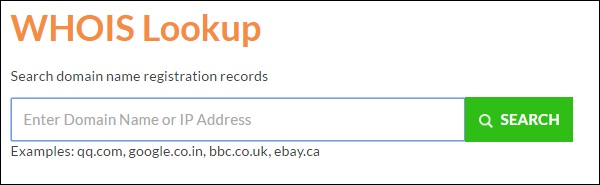


Footprinting is basically the first step where hacker gathers as much information as possible to find ways to intrude into a target system or at least decide what type of attacks will be more suitable for the target.
During this phase, a hacker can collect the following information −
- Domain name
- IP Addresses
- Namespaces
- Employee information
- Phone numbers
- E-mails
- Job Information
In the following section, we will discuss how to extract the basic and easily accessible information about any computer system or network that is linked to the Internet.
Domain Name Information
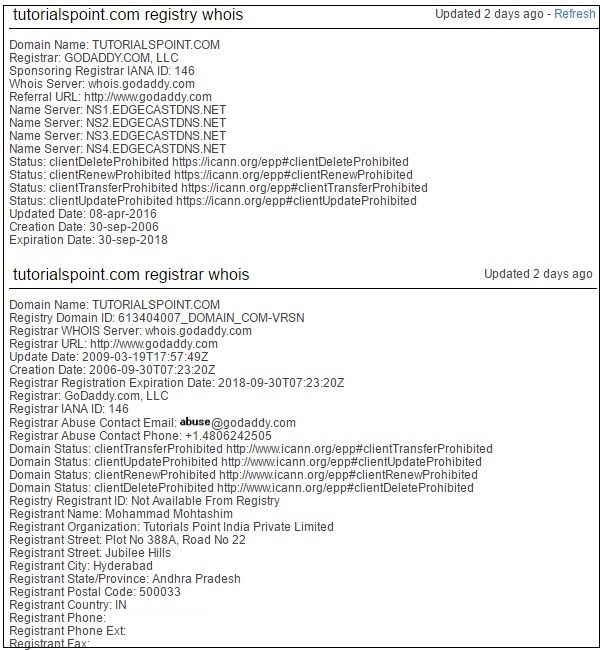
You can use http://www.whois.com/whois website to get detailed information about a domain name information including its owner, its registrar, date of registration, expiry, name server, owner's contact information, etc.
Here is a sample record of www.tutorialspoint.com extracted from WHOIS Lookup −
Quick Fix
It's always recommended to keep your domain name profile a private one which should hide the above-mentioned information from potential hackers.
Finding IP Address
You can use ping command at your prompt. This command is available on Windows as well as on Linux OS. Following is the example to find out the IP address of tutorialspoint.com
$ping tutorialspoint.com
It will produce the following result −
PING tutorialspoint.com (66.135.33.172) 56(84) bytes of data.64 bytes from 66.135.33.172: icmp_seq = 1 ttl = 64 time = 0.028 ms64 bytes from 66.135.33.172: icmp_seq = 2 ttl = 64 time = 0.021 ms64 bytes from 66.135.33.172: icmp_seq = 3 ttl = 64 time = 0.021 ms64 bytes from 66.135.33.172: icmp_seq = 4 ttl = 64 time = 0.021 ms
Finding Hosting Company
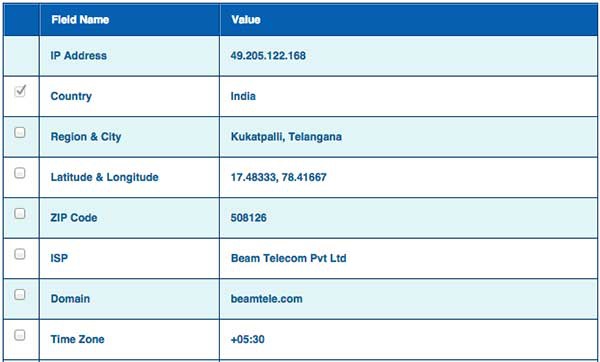
Once you have the website address, you can get further detail by using ip2location.com website. Following is the example to find out the details of an IP address −
Here the ISP row gives you the detail about the hosting company because IP addresses are usually provided by hosting companies only.
Quick Fix
If a computer system or network is linked with the Internet directly, then you cannot hide the IP address and the related information such as the hosting company, its location, ISP, etc. If you have a server containing very sensitive data, then it is recommended to keep it behind a secure proxy so that hackers cannot get the exact details of your actual server. This way, it will be difficult for any potential hacker to reach your server directly.
Another effective way of hiding your system IP and ultimately all the associated information is to go through a Virtual Private Network (VPN). If you configure a VPN, then the whole traffic routes through the VPN network, so your true IP address assigned by your ISP is always hidden.
IP Address Ranges
Small sites may have a single IP address associated with them, but larger websites usually have multiple IP addresses serving different domains and sub-domains.
You can obtain a range of IP addresses assigned to a particular company using American Registry for Internet Numbers (ARIN).
You can enter company name in the highlighted search box to find out a list of all the assigned IP addresses to that company.
History of the Website
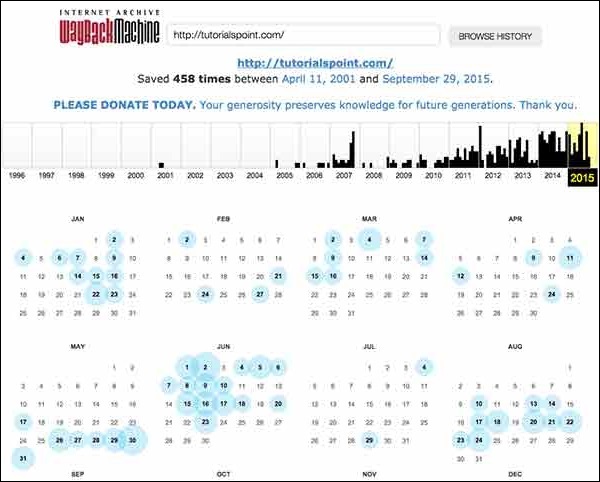
It is very easy to get a complete history of any website using www.archive.org.
You can enter a domain name in the search box to find out how the website was looking at a given point of time and what were the pages available on the website on different dates.
Quick Fix
Though there are some advantages of keeping your website in an archive database, but if you do not like anybody to see how your website progressed through different stages, then you can request archive.org to delete the history of your website.


No comments:
Post a Comment