Fingerprinting
The term OS fingerprinting in Ethical Hacking refers to any method used to determine what operating system is running on a remote computer. This could be −
- Active Fingerprinting − Active fingerprinting is accomplished by sending specially crafted packets to a target machine and then noting down its response and analyzing the gathered information to determine the target OS. In the following section, we have given an example to explain how you can use NMAP tool to detect the OS of a target domain.
- Passive Fingerprinting − Passive fingerprinting is based on sniffer traces from the remote system. Based on the sniffer traces (such as Wireshark) of the packets, you can determine the operating system of the remote host.
We have the following four important elements that we will look at to determine the operating system −
- TTL − What the operating system sets the Time-To-Live on the outbound packet.
- Window Size − What the operating system sets the Window Size at.
- DF − Does the operating system set the Don't Fragment bit.
- TOS − Does the operating system set the Type of Service, and if so, at what.
By analyzing these factors of a packet, you may be able to determine the remote operating system. This system is not 100% accurate, and works better for some operating systems than others.
Basic Steps
Before attacking a system, it is required that you know what operating system is hosting a website. Once a target OS is known, then it becomes easy to determine which vulnerabilities might be present to exploit the target system.
Below is a simple nmap command which can be used to identify the operating system serving a website and all the opened ports associated with the domain name, i.e., the IP address.
$nmap -O -v tutorialspoint.com
It will show you the following sensitive information about the given domain name or IP address −
Starting Nmap 5.51 ( http://nmap.org ) at 2015-10-04 09:57 CDTInitiating Parallel DNS resolution of 1 host. at 09:57Completed Parallel DNS resolution of 1 host. at 09:57, 0.00s elapsedInitiating SYN Stealth Scan at 09:57Scanning tutorialspoint.com (66.135.33.172) [1000 ports]Discovered open port 22/tcp on 66.135.33.172Discovered open port 3306/tcp on 66.135.33.172Discovered open port 80/tcp on 66.135.33.172Discovered open port 443/tcp on 66.135.33.172Completed SYN Stealth Scan at 09:57, 0.04s elapsed (1000 total ports)Initiating OS detection (try #1) against tutorialspoint.com (66.135.33.172)Retrying OS detection (try #2) against tutorialspoint.com (66.135.33.172)Retrying OS detection (try #3) against tutorialspoint.com (66.135.33.172)Retrying OS detection (try #4) against tutorialspoint.com (66.135.33.172)Retrying OS detection (try #5) against tutorialspoint.com (66.135.33.172)Nmap scan report for tutorialspoint.com (66.135.33.172)Host is up (0.000038s latency).Not shown: 996 closed portsPORT STATE SERVICE22/tcp open ssh80/tcp open http443/tcp open https3306/tcp open mysqlTCP/IP fingerprint:OS:SCAN(V=5.51%D=10/4%OT=22%CT=1%CU=40379%PV=N%DS=0%DC=L%G=Y%TM=56113E6D%P=OS:x86_64-redhat-linux-gnu)SEQ(SP=106%GCD=1%ISR=109%TI=Z%CI=Z%II=I%TS=A)OPSOS:(O1=MFFD7ST11NW7%O2=MFFD7ST11NW7%O3=MFFD7NNT11NW7%O4=MFFD7ST11NW7%O5=MFFOS:D7ST11NW7%O6=MFFD7ST11)WIN(W1=FFCB%W2=FFCB%W3=FFCB%W4=FFCB%W5=FFCB%W6=FFOS:CB)ECN(R=Y%DF=Y%T=40%W=FFD7%O=MFFD7NNSNW7%CC=Y%Q=)T1(R=Y%DF=Y%T=40%S=O%AOS:=S+%F=AS%RD=0%Q=)T2(R=N)T3(R=N)T4(R=Y%DF=Y%T=40%W=0%S=A%A=Z%F=R%O=%RD=0%OS:Q=)T5(R=Y%DF=Y%T=40%W=0%S=Z%A=S+%F=AR%O=%RD=0%Q=)T6(R=Y%DF=Y%T=40%W=0%S=OS:A%A=Z%F=R%O=%RD=0%Q=)T7(R=Y%DF=Y%T=40%W=0%S=Z%A=S+%F=AR%O=%RD=0%Q=)U1(R=OS:Y%DF=N%T=40%IPL=164%UN=0%RIPL=G%RID=G%RIPCK=G%RUCK=G%RUD=G)IE(R=Y%DFI=N%OS:T=40%CD=S)
If you do not have nmap command installed on your Linux system, then you can install it using the following yum command −
$yum install nmap
You can go through nmap command in detail to check and understand the different features associated with a system and secure it against malicious attacks.
Quick Fix
You can hide your main system behind a secure proxy server or a VPN so that your complete identity is safe and ultimately your main system remains safe.
Port Scanning
We have just seen information given by nmap command. This command lists down all the open ports on a given server.
PORT STATE SERVICE22/tcp open ssh80/tcp open http443/tcp open https3306/tcp open mysql
You can also check if a particular port is opened or not using the following command −
$nmap -sT -p 443 tutorialspoint.com
It will produce the following result −
Starting Nmap 5.51 ( http://nmap.org ) at 2015-10-04 10:19 CDTNmap scan report for tutorialspoint.com (66.135.33.172)Host is up (0.000067s latency).PORT STATE SERVICE443/tcp open httpsNmap done: 1 IP address (1 host up) scanned in 0.04 seconds
Once a hacker knows about open ports, then he can plan different attack techniques through the open ports.
Quick Fix
It is always recommended to check and close all the unwanted ports to safeguard the system from malicious attacks.
Ping Sweep
A ping sweep is a network scanning technique that you can use to determine which IP address from a range of IP addresses map to live hosts. Ping Sweep is also known as ICMP sweep.
You can use fping command for ping sweep. This command is a ping-like program which uses the Internet Control Message Protocol (ICMP) echo request to determine if a host is up.
fping is different from ping in that you can specify any number of hosts on the command line, or specify a file containing the lists of hosts to ping. If a host does not respond within a certain time limit and/or retry limit, it will be considered unreachable.
Quick Fix
To disable ping sweeps on a network, you can block ICMP ECHO requests from outside sources. This can be done using the following command which will create a firewall rule in iptable.
$iptables -A OUTPUT -p icmp --icmp-type echo-request -j DROP
DNS Enumeration
Domain Name Server (DNS) is like a map or an address book. In fact, it is like a distributed database which is used to translate an IP address 192.111.1.120 to a name www.example.com and vice versa.
DNS enumeration is the process of locating all the DNS servers and their corresponding records for an organization. The idea is to gather as much interesting details as possible about your target before initiating an attack.
You can use nslookup command available on Linux to get DNS and host-related information. In addition, you can use the following DNSenum script to get detailed information about a domain −
DNSenum.pl
DNSenum script can perform the following important operations −
- Get the host's addresses
- Get the nameservers
- Get the MX record
- Perform axfr queries on nameservers
- Get extra names and subdomains via Google scraping
- Brute force subdomains from file can also perform recursion on subdomain that has NS records
- Calculate C class domain network ranges and perform whois queries on them
- Perform reverse lookups on netranges
Quick Fix
DNS Enumeration does not have a quick fix and it is really beyond the scope of this tutorial. Preventing DNS Enumeration is a big challenge.
If your DNS is not configured in a secure way, it is possible that lots of sensitive information about the network and organization can go outside and an untrusted Internet user can perform a DNS zone transfer.
Sniffing
Sniffing is the process of monitoring and capturing all the packets passing through a given network using sniffing tools. It is a form of “tapping phone wires” and get to know about the conversation. It is also called wiretapping applied to the computer networks.
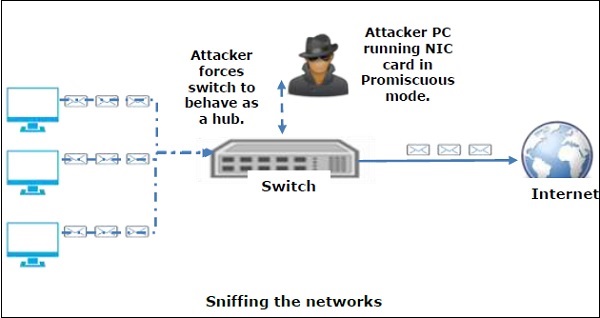
There is so much possibility that if a set of enterprise switch ports is open, then one of their employees can sniff the whole traffic of the network. Anyone in the same physical location can plug into the network using Ethernet cable or connect wirelessly to that network and sniff the total traffic.
In other words, Sniffing allows you to see all sorts of traffic, both protected and unprotected. In the right conditions and with the right protocols in place, an attacking party may be able to gather information that can be used for further attacks or to cause other issues for the network or system owner.
What can be sniffed?
One can sniff the following sensitive information from a network −
- Email traffic
- FTP passwords
- Web traffics
- Telnet passwords
- Router configuration
- Chat sessions
- DNS traffic
How it works
A sniffer normally turns the NIC of the system to the promiscuous mode so that it listens to all the data transmitted on its segment.
Promiscuous mode refers to the unique way of Ethernet hardware, in particular, network interface cards (NICs), that allows an NIC to receive all traffic on the network, even if it is not addressed to this NIC. By default, a NIC ignores all traffic that is not addressed to it, which is done by comparing the destination address of the Ethernet packet with the hardware address (a.k.a. MAC) of the device. While this makes perfect sense for networking, non-promiscuous mode makes it difficult to use network monitoring and analysis software for diagnosing connectivity issues or traffic accounting.
A sniffer can continuously monitor all the traffic to a computer through the NIC by decoding the information encapsulated in the data packets.
Types of Sniffing
Sniffing can be either Active or Passive in nature.
Passive Sniffing
In passive sniffing, the traffic is locked but it is not altered in any way. Passive sniffing allows listening only. It works with Hub devices. On a hub device, the traffic is sent to all the ports. In a network that uses hubs to connect systems, all hosts on the network can see the traffic. Therefore, an attacker can easily capture traffic going through.
The good news is that hubs are almost obsolete nowadays. Most modern networks use switches. Hence, passive sniffing is no more effective.
Active Sniffing
In active sniffing, the traffic is not only locked and monitored, but it may also be altered in some way as determined by the attack. Active sniffing is used to sniff a switch-based network. It involves injecting address resolution packets (ARP) into a target network to flood on the switch content addressable memory (CAM) table. CAM keeps track of which host is connected to which port.
Following are the Active Sniffing Techniques −
- MAC Flooding
- DHCP Attacks
- DNS Poisoning
- Spoofing Attacks
- ARP Poisoning
Protocols which are affected
Protocols such as the tried and true TCP/IP were never designed with security in mind and therefore do not offer much resistance to potential intruders. Several rules lend themselves to easy sniffing −
- HTTP − It is used to send information in the clear text without any encryption and thus a real target.
- SMTP (Simple Mail Transfer Protocol) − SMTP is basically utilized in the transfer of emails. This protocol is efficient, but it does not include any protection against sniffing.
- NNTP (Network News Transfer Protocol)− It is used for all types of communications, but its main drawback is that data and even passwords are sent over the network as clear text.
- POP (Post Office Protocol) − POP is strictly used to receive emails from the servers. This protocol does not include protection against sniffing because it can be trapped.
- FTP (File Transfer Protocol) − FTP is used to send and receive files, but it does not offer any security features. All the data is sent as clear text that can be easily sniffed.
- IMAP (Internet Message Access Protocol) − IMAP is same as SMTP in its functions, but it is highly vulnerable to sniffing.
- Telnet − Telnet sends everything (usernames, passwords, keystrokes) over the network as clear text and hence, it can be easily sniffed.
Sniffers are not the dumb utilities that allow you to view only live traffic. If you really want to analyze each packet, save the capture and review it whenever time allows.
Hardware Protocol Analyzers
Before we go into further details of sniffers, it is important that we discuss about hardware protocol analyzers. These devices plug into the network at the hardware level and can monitor traffic without manipulating it.
- Hardware protocol analyzers are used to monitor and identify malicious network traffic generated by hacking software installed in the system.
- They capture a data packet, decode it, and analyze its content according to certain rules.
- Hardware protocol analyzers allow attackers to see individual data bytes of each packet passing through the cable.
These hardware devices are not readily available to most ethical hackers due to their enormous cost in many cases.
Lawful Interception
Lawful Interception (LI) is defined as legally sanctioned access to communications network data such as telephone calls or email messages. LI must always be in pursuance of a lawful authority for the purpose of analysis or evidence. Therefore, LI is a security process in which a network operator or service provider gives law enforcement officials permission to access private communications of individuals or organizations.
Almost all countries have drafted and enacted legislation to regulate lawful interception procedures; standardization groups are creating LI technology specifications. Usually, LI activities are taken for the purpose of infrastructure protection and cyber security. However, operators of private network infrastructures can maintain LI capabilities within their own networks as an inherent right, unless otherwise prohibited.
LI was formerly known as wiretapping and has existed since the inception of electronic communications.
Sniffing Tools
There are so many tools available to perform sniffing over a network, and they all have their own features to help a hacker analyze traffic and dissect the information. Sniffing tools are extremely common applications. We have listed here some of the interesting ones −
- BetterCAP − BetterCAP is a powerful, flexible and portable tool created to perform various types of MITM attacks against a network, manipulate HTTP, HTTPS and TCP traffic in real-time, sniff for credentials, and much more.
- Ettercap − Ettercap is a comprehensive suite for man-in-the-middle attacks. It features sniffing of live connections, content filtering on the fly and many other interesting tricks. It supports active and passive dissection of many protocols and includes many features for network and host analysis.
- Wireshark − It is one of the most widely known and used packet sniffers. It offers a tremendous number of features designed to assist in the dissection and analysis of traffic.
- Tcpdump − It is a well-known command-line packet analyzer. It provides the ability to intercept and observe TCP/IP and other packets during transmission over the network. Available at www.tcpdump.org.
- WinDump − A Windows port of the popular Linux packet sniffer tcpdump, which is a command-line tool that is perfect for displaying header information.
OmniPeek − Manufactured by WildPackets, OmniPeek is a commercial product that is the evolution of the product EtherPeek.
- Dsniff − A suite of tools designed to perform sniffing with different protocols with the intent of intercepting and revealing passwords. Dsniff is designed for Unix and Linux platforms and does not have a full equivalent on the Windows platform.
- EtherApe − It is a Linux/Unix tool designed to display graphically a system's incoming and outgoing connections.
- MSN Sniffer − It is a sniffing utility specifically designed for sniffing traffic generated by the MSN Messenger application.
- NetWitness NextGen − It includes a hardware-based sniffer, along with other features, designed to monitor and analyze all traffic on a network. This tool is used by the FBI and other law enforcement agencies.
A potential hacker can use any of these sniffing tools to analyze traffic on a network and dissect information.


No comments:
Post a Comment